About the connection example
Please see below for an example of connection settings for this driver.
Applicable models etc. |
explanation |
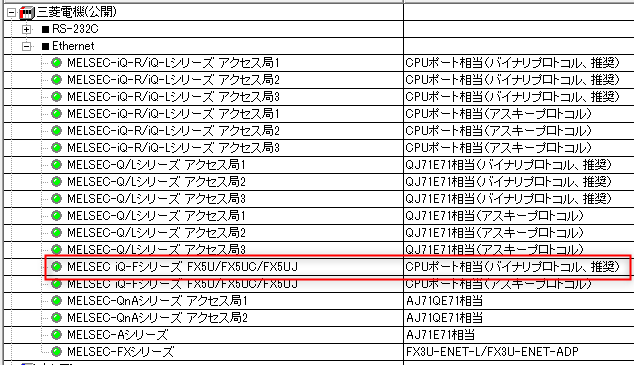
This is an example of Ethernet connection settings with the iQ-F series.
|
Device List
The compatible devices are as follows (see here for how to view the device list).
device |
keyword |
Start address |
explanation |
unit |
reading |
Writing |
Input Relay |
X |
000000 |
Hexadecimal |
bit |
○ |
○ |
Output Relay |
Y |
000000 |
Hexadecimal |
bit |
○ |
○ |
Internal Relay |
M |
000000 |
Decimal |
bit |
○ |
○ |
Special Relay |
SM |
000000 |
Decimal |
bit |
○ |
○ |
Latching Relay |
L |
000000 |
Decimal |
bit |
○ |
○ |
Annunciator |
F |
000000 |
Decimal |
bit |
○ |
○ |
Edge Relay |
V |
000000 |
Hexadecimal |
bit |
○ |
○ |
Link Relay |
B |
000000 |
Hexadecimal |
bit |
○ |
○ |
Special Link Relay |
SB |
000000 |
Decimal |
bit |
○ |
○ |
Step Relay |
S |
000000 |
Decimal |
bit |
○ |
○ |
Timer Contact |
TS |
000000 |
Decimal |
bit |
○ |
○ |
Timer coil |
TC |
000000 |
Decimal |
bit |
○ |
○ |
Integration Timer Contact |
SS |
000000 |
Decimal |
bit |
○ |
○ |
Accumulator timer coil |
SC |
000000 |
Decimal |
bit |
○ |
○ |
Counter Contact |
CS |
000000 |
Decimal |
bit |
○ |
○ |
Counter coil |
CC |
000000 |
Decimal |
bit |
○ |
○ |
Timer current value |
TN |
000000 |
Decimal |
word |
○ |
● |
Current value of the integration timer |
SN |
000000 |
Decimal |
word |
○ |
● |
Counter current value |
CN |
000000 |
Decimal |
word |
○ |
● |
Data Register |
D |
000000 |
Decimal |
word |
○ |
● |
Special Registers |
SD |
000000 |
Decimal |
word |
○ |
● |
Link Register |
W |
000000 |
Hexadecimal |
word |
○ |
● |
Special Link Register |
SW |
000000 |
Hexadecimal |
word |
○ |
● |
Index Register |
Z |
000000 |
Decimal |
word |
○ |
● |
File register (current block) |
R |
000000 |
Decimal |
word |
○ |
● |
Binary and ASCII protocols
Mitsubishi Electric's communication protocol can be selected from "Binary Code Communication" and "ASCII Code Communication". Binary code communication has a shorter packet length, so it allows for faster communication. Unless there is a specific reason not to, we recommend binary code communication.
For example, if you are using GX-Works3, set it in the network parameter settings.
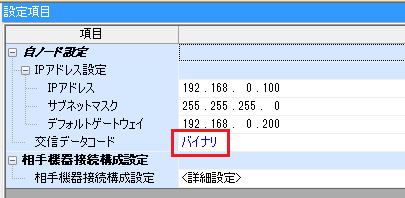
To communicate in binary code, select the binary protocol when selecting the following units.