What are system properties?
Tag system properties are properties that "units", "folders" and "tags" have as standard. System properties can be accessed in the same way as normal tags, using the following format:
▪For units
(unit name)!(property name)
▪For folders
(Unit name).(Folder name)!(Property name)
▪For tags
(Unit name).(Folder name).(Tag name)!(Property name)
Example of using system properties
For example, the "Alive" property below represents the alive state of the PLC.
U01!Alive
Below are the steps to check the value of the Alive property on the tag monitor.
1.Create units, folders, and tags as needed.
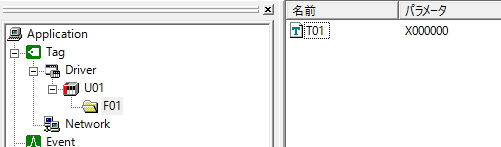
2.Right-click on the following location in the Output View at the bottom of the screen, select "Insert", and add a "Tag Monitor"
3.After going online, enter "U01.F01.T01" and "U01!Alive" into the cells.
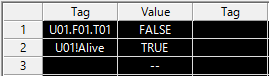
4.Verify that the value of U01!Alive changes to TRUE/FALSE by turning the PLC power ON/OFF