Features of this view
The output view displays messages such as communication errors.

The output view can also save the contents of messages to a text file. Saving messages as a log file can be a very useful clue, especially when troubleshooting problems.
This log file is called the "output log."
Configuration Specifications
Property Specifications |
|||||
|---|---|---|---|---|---|
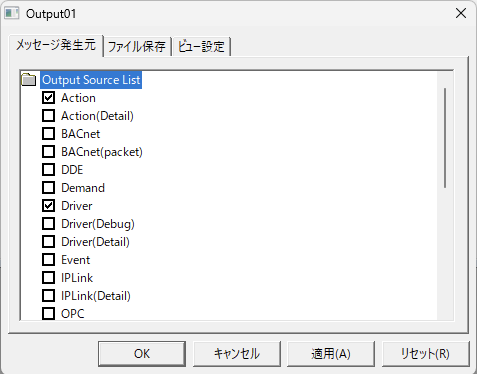
Message Origin |
In the output view, you can select the type of messages to display. This setting is done by selecting the type of messages to display in the view from the "Message Source" tab of the output view properties. For example, by adding multiple output views and selecting different message sources for each view, you can obtain logs for each message type separately.
|
||||
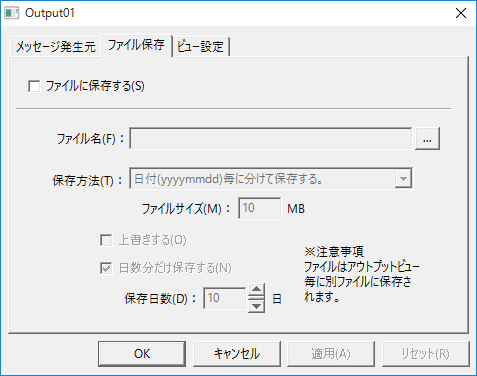
File saving |
In the "File saving" tab, you can configure settings for saving messages to files. When enabling file output, you usually select "Add date to file name" to create separate files for each day. If you enable file saving, we also recommend that you specify the number of days to save log files so that files older than a certain period are automatically deleted.
Be careful if you want to save logs, as the default setting is not to save them.
|
||||
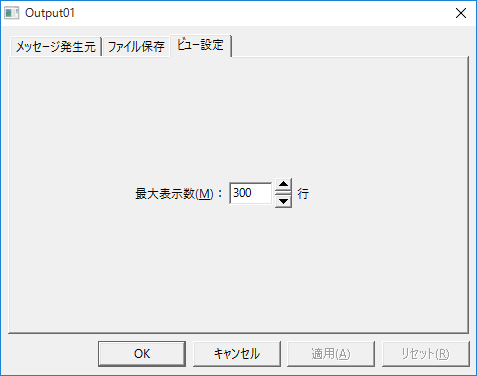
View Settings |
Set the maximum number of items to display. Anything exceeding this setting will not be displayed.
Please note that if you do not save the file, you will not be able to view any logs that exceed this number of lines.
|
||||