User-defined functions
User-defined functions are functions that developers can create themselves.
User-defined functions can be written for each object. Functions written in an object can be called and executed from other objects by absolute or relative path reference, just like methods and properties.
A user-defined function is written by writing the function name after the function keyword, and defining arguments in ( ) separated by commas (,). Function and argument names can be freely named. The return keyword can be used to end the function and return a return value.
The following is an example of a user-defined function.
function Total(a, b)
{
 return a + b;
}
In this example, the function name is "Total". When two arguments, a and b, are passed, the function returns the calculation result of "a+b".
User-defined function syntax
The syntax for a user-defined function is:
function FunctionName( {
return } |
1)You can specify as many parameters as you need.
2)If no parameters are required, they can be omitted, but you must include "()" after the function name (for example, "function FunctionName()").
3)The return keyword allows you to exit a function and return a value to the caller.
4)The return value of return can be omitted. If the return value is omitted, the function will end at the "return" position.
5)You can write any number of return keywords in a script. You can also omit return itself. In that case, the function will terminate when the script has run to the end.
Example) If there is no return
function SampleFunction()
{
//
Example) If there is one return
function Total(a, b)
{
    return a + b;
}
Example) When there are multiple return
function ErrMessage(a)
{
 switch (a)
 {
  case 1: return "Error1";
  case 2: return "Error2";
  case 3: return "Errro3";
  }
  return "Not Found Error code";
}
6)You can return values through parameters by preceding the parameter with an "&" (pass by reference).
Example: Returning a value to an argument
function SampleFunction()
{
var Param;
GetParam(Param); //Param returns 100.
}

function GetParam(&vParam)
{
vParam = 100; //Assign a value to the variable passed as an argument.
}
|
Recursive function calls are not supported. |

|
For information on naming user-defined functions, see "Naming Rules". |

Example of creating a user-defined function
Here we will introduce an example of creating a user-defined function in Button control.
The creation steps are as follows:
1.After pasting Button control into the form, open the script editor and add the following OnMouseUp event.
2.Write the user-defined function outside the OnMouseUp event blanket. In this example, we'll use the following function name, "Total" (you can write it below the OnMouseUp event. It doesn't matter where you write the function).
function Total(a, b)
{
	return a + b;
}
3.Write the OnMouseUp event so that it calls the Total function (the example below uses the OpenMsg generic function to display the result of the Total function on the screen). When you run it in Panel Browser and press the button, it should display a message with the sum of the two numbers passed as arguments.
event OnMouseUp(button)
{
	::OpenMsg(Total(2,5));
}
Example of creating a generic user-defined function
A user-defined function defined in the root object is called a generic user-defined function.
A generic user-defined function is a function that can be used throughout the system. Just like a root method, you can call it from any object by prepending "::".
As an example, copy the "Total" function created above to the root object and write it as follows.
//Define function in script at root
function Total(a, b)
{
	return a + b;
}
Then you can call it from any script using the following:
event OnMouseUp(button)
{
	::OpenMsg( ::Total(2,5) ); //TotalThe "::" on the left indicates that this is a root user-defined function
}
|
User-defined functions defined in the root can be called from any form or control, so it is a good idea to define user-defined functions that you want to share across the entire system in the root. If you create a user-defined function in the root with the same name as a route method that is already defined in advance, the user-defined function you created will be called first. |
|
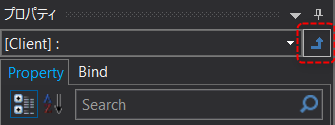
If you want to edit the root script, select the root object and open the script editor. To select the root object, click the arrow icon to the right of the combo box on the property page:
If the script editor is already open, you can switch to the root script by simply selecting the root using the icon in the image above.
|