Uninstall
When you no longer need an installed application, please uninstall (delete) it using the following procedure.
1.In the Control Panel, double-click “Programs and Features.”
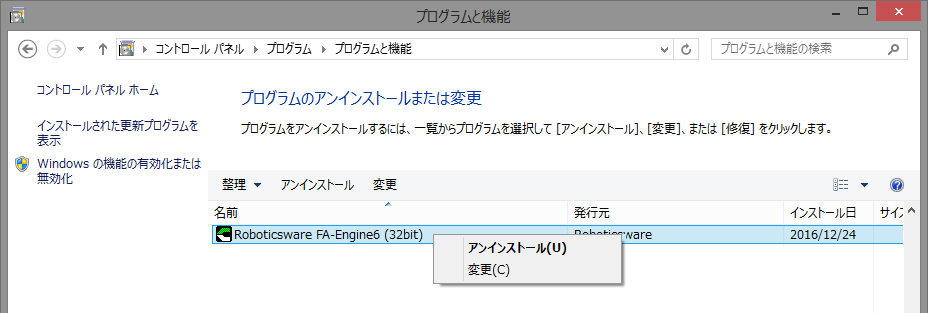
2.Select “Roboticsware FA-Engine6 (32bit/64bit)”, right-click and click “Uninstall”.
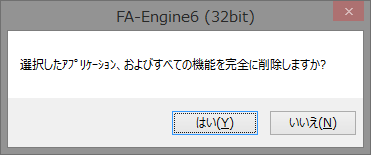
3.Click “Yes”.
When the uninstallation is complete, the following dialog will be displayed.
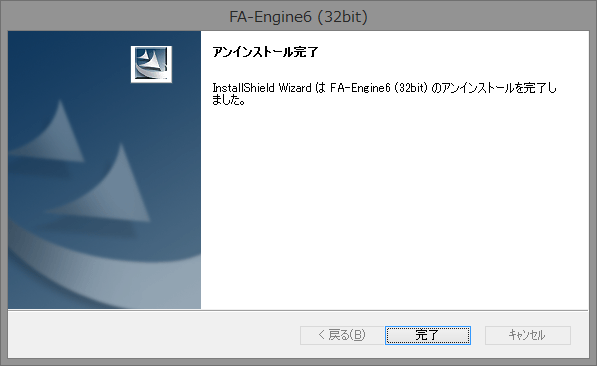
4.Click “Finish.”
This completes the uninstallation process.
About files that are not deleted
The following files will not be deleted even if you uninstall the software.
•Mitsubishi Electric Library
FA-Engine uses a Mitsubishi Electric library to communicate (private protocol) with Mitsubishi Electric's PLC. This library may be used by multiple applications, so it will not be deleted from your computer even if you uninstall FA-Engine. You can delete the library manually after uninstallation only if you are sure that you will not use the library. Normally, the actual library file is stored in "Library\EasySocket" in the installation folder. If the "Library\EasySocket" folder does not exist in the folder where FA-Engine is installed, it is strongly recommended that you do not delete the library, as the library may have already been installed by another application.