How to install
The installer for FA-Engine6 can be downloaded from our developer site. The installer is available in 32-bit and 64-bit versions.
installer_faengine_32_xxxx.exe --- FA-Engine 32-bit installer
installer_faengine_64_xxxx.exe --- FA-Engine 64-bit installer
We usually recommend the 32-bit version. The reason is that user applications developed with the 32-bit version usually run on both 32-bit and 64-bit OS, while user applications developed with the 64-bit version only run on 64-bit OS.
Please note that the following communication drivers cannot be used with FA-Engine (64-bit version).
•Communication driver using Mitsubishi's private protocol (mainly used with MELSECNET/CCLINK/CPU direct ports)
Below are details on the compatibility of the 32-bit and 64-bit versions of FA-Engine.
FA-Engine 32bit version |
FA-Engine 64bit version |
|
If the development environment OS is 32bit |
Development possible. Compiled as a 32bit (x86) app. |
Development not possible (installation not possible) |
If the development environment OS is 64bit *1 |
Development is possible. Compiled as a 32-bit (x86) app. |
Development possible. Compiled as 64bit (x64) app. |
If the OS on which the user application runs is 32-bit |
Executable. |
Not executable |
If the OS on which the user application runs is 64-bit |
Executable. (The executable application runs on WOW64.) |
Executable
|
*1 It is also possible to install a mixed version of FA-Engine, 32-bit and 64-bit.
To start the installation, right-click the downloaded installer and select "Run as administrator." Follow the instructions on the installer screen to proceed with the installation.
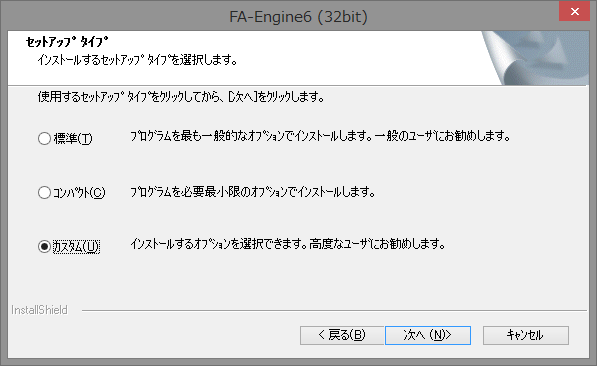
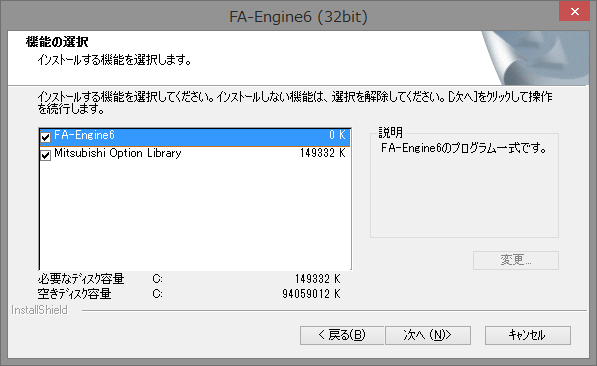
In the FA-Engine 32-bit installer, if you select "Custom" during the installation, you can select the details of the installation. If you do not need communication using Mitsubishi's private protocol, you can set up with a smaller capacity by unchecking "Mitsubishi Option Library". On the other hand, the FA-Engine 64-bit installer does not install the Mitsubishi private protocol library.