overview
This is an example of reading values in three ways.
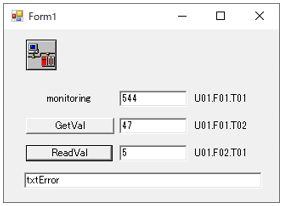
This sample is stored in:
setting
Tag configuration
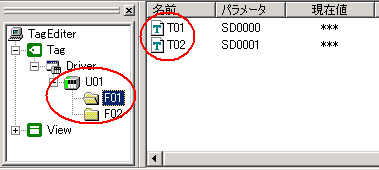
1.Set the tags "U01.F01.T01", "U01.F01.T02", and "U01.F02.T01".
program
Describes the loading process.
●VB.Net
'Read 1 Private Sub AxEng1_ValueChanged(ByVal sender As Object, ByVal e As AxFAENGINELib6._DFAEngineEvents_ValueChangedEvent) Handles AxEng1.ValueChanged Select Case e.tagPath Case "U01.F01.T01" txtRead1.Text = CStr(e.value) End Select End Sub
'Read 2 Private Sub btnRead2_Click(ByVal sender As System.Object, ByVal e As System.EventArgs) Handles btnRead2.Click txtRead2.Text = CStr(AxEng1.GetVal("U01.F01.T02")) End Sub
'Read 3 Private Sub btnRead3_Click(ByVal sender As System.Object, ByVal e As System.EventArgs) Handles btnRead3.Click Dim a As Object = Nothing If AxEng1.ReadVal("U01.F02.T01", a) Then txtRead3.Text = CStr(a) Else txtError.Text = CStr(AxEng1.ErrCode) & ":" & AxEng1.ErrMessage End If End Sub
|
Commentary
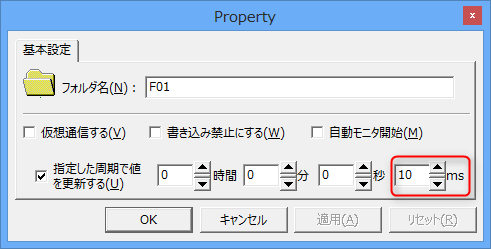
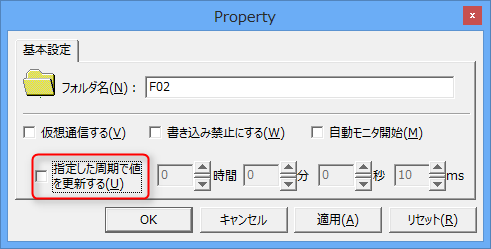
The key point of this sample is that tags that require automatic updates and other tags are managed separately in two folders. Automatic cache updates are required for monitoring and GetVal, but automatic updates are not required for ReadVal. Therefore, a folder with automatic updates, "F01", and a folder without automatic updates, "F02", are created, and tags are registered separately in each. As a result, no unnecessary communication occurs.
Automatically updated folder "F01" |
No automatic update folder "F02" |
U01.F01.T01 / U01.F01.T02 |
U01.F02.T01 |
 |
 |