overview
This is an example of writing a value.
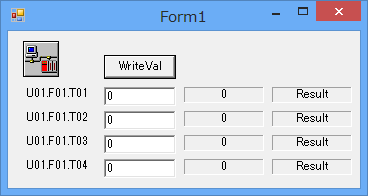
This sample is stored in:
setting
Tag configuration
1.Set tags "T01" to "T04".
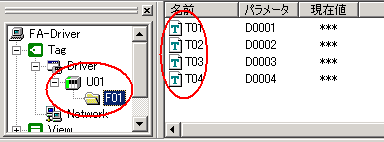
program
Describes the write process.
●VB.Net
'write Private Sub btnWrite_Click(ByVal sender As System.Object, ByVal e As System.EventArgs) Handles btnWrite.Click Dim TagPaths(4) As String Dim Values(4) As Object 'Be sure to declare it as an object. Dim Results As Object = Nothing TagPaths(0) = "U01.F01.T01" TagPaths(1) = "U01.F01.T02" TagPaths(2) = "U01.F01.T03" TagPaths(3) = "U01.F01.T04" Values(0) = txtWrite(0).Text Values(1) = txtWrite(1).Text Values(2) = txtWrite(2).Text Values(3) = txtWrite(3).Text
Dim i As Integer If AxEng1.WriteVals(4, TagPaths, Values, Results) Then For i = 0 To 3 If CBool(Results(i)) Then lblResult(i).Text = "Success!" Else lblResult(i).Text = "Error!" End If Next i Else For i = 0 To 3 lblResult(i).Text = "Error!" Next i End If End Sub |
Commentary
WriteVals can write to multiple tags at once. If you need to write to multiple consecutive addresses (such as D0000 to D0100), it is faster to process them all at once with WriteVals than to call WriteVal multiple times, as the communication packets are processed together. Also, when dealing with a large number of points, you can use array tags to communicate quickly and easily.
The success or failure of WriteVals itself is returned as the return value, and the success or failure of each tag is stored as a Boolean value in the Results argument. The Results argument is only valid if WriteVals is successful.
Therefore, in the sample code above, the return value of WriteVals is used to determine whether the processing of WriteVals itself was successful, and the Results argument is checked only if WriteVals was successful.
|
Be sure to declare the Values argument in WriteVals as an object array (so that you can process multiple different types of write values, such as Boolean type, numeric type, string type, Boolean array type, numeric array type, and string array type). |
