|
Button control (Button)
Button control is a button that performs various processes. It is used when placing an operation switch on the screen.
Optionally an image (such as bmp or jpeg) and/or a lamp can be displayed along with the button.
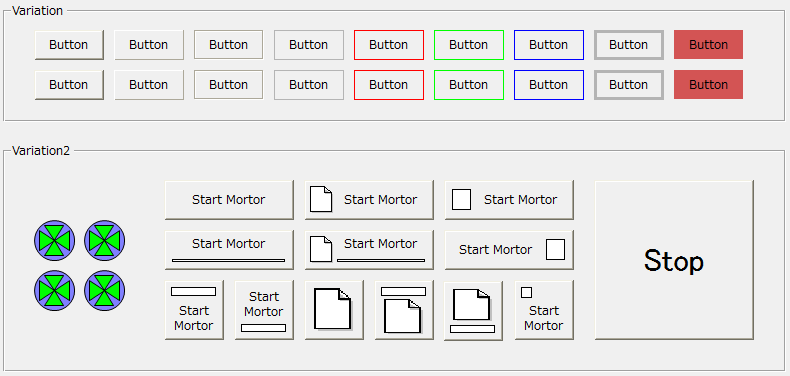
Press the button
Clicking a Button control with the mouse will change the button's appearance as if it is pressed down. If a Button control has focus, you can press the button with the Space key instead of the mouse. Clicking with the mouse will trigger a OnMouseDown/OnMouseUp event. Normally, if you want to perform some processing, you will want to perform the processing with the OnMouseUp event rather than the OnMouseDown event. This is because the OnMouseDown event will occur at the same time as the mouse click, but with OnMouseUp you can cancel the execution of the processing.
*If you press a mouse button and then move the mouse away from the button before releasing it, the OnMouseUp event will not occur and you can cancel the process.
|
Switch Value
The button has a SwitchValue property, which switches between ON/OFF when the button is pressed.
1) When the value changes, the OnSwitchChanged event occurs.
2) You can bind a tag to SwitchValue to turn the tag's value ON/OFF.
3) The SwitchType property determines how the SwitchValue changes when the button is pressed. The SwitchType property can be selected from the following five types.
|
|
|
|
A_SWITCH
|
A-contact switch
|
While pressed, SwitchValue will be turned ON.
|
B_SWITCH
|
B-contact switch
|
While pressed, turns SwitchValue OFF.
|
ON_SWITCH
|
ON switch
|
When pressed, it turns SwitchValue ON.
|
OFF_SWITCH
|
OFF Switch
|
When pressed, it turns SwitchValue OFF.
|
ALTERNATE_SWITCH
|
Alternate Switch
|
When pressed, it inverts SwitchValue (when OFF it turns it ON, and when ON it turns it OFF).
|
|
|