What is an action?
The various server functions provided by Panel Server are called "actions." Actions provide a wide variety of functions, such as logging, alarm monitoring, report aggregation (Daily/Monthly/Yearly Report), calculations between tags, sending FTP and email, running external applications, and gateways that bridge tags of different PLC, making it easy to build a variety of processes.
Actions are generally executed when triggered by a call from an "event". Some actions also have server functions that can be used by connecting from the client function "Panel Browser". Some actions only have server functions, and these functions can be used by connecting from a client rather than being called from an event.
Actions can be added from "Action" in the tree selection view of Panel Server.
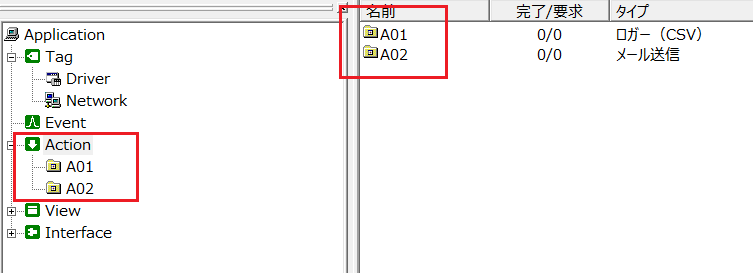
|
A common resource cannot be set multiple times in multiple actions. For example, you cannot specify the same folder, file, or in the case of a database, the same table in multiple actions.
Non-supported example) •Specify the same "table" in multiple logger actions (ODBC). •Specifying the same "file" or "folder" in multiple logger actions (CSV). •Specifying the same "summary folder" in multiple summary actions.
*In the above, the resources are "table", "file", and "summary folder".
|

Action behavior
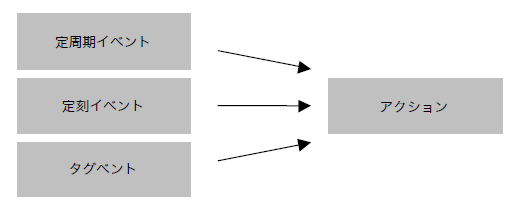
An action is executed when an event is triggered. One action can be executed by multiple events. If multiple events occur at the same time, they will be executed in the order they were called.
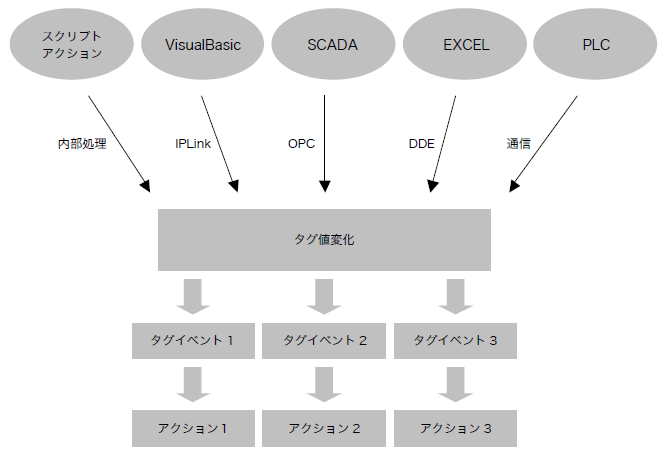
By applying Tag event, you can execute actions using signal values from PLC or external applications as triggers.
|
For information on triggering actions from multiple events, please refer to "Executing the same action with multiple events". |
