overview
Panel Server is a server application that performs server processing such as communication with PLC, alarms, and data logs. Panel Browser connects to Panel Server to receive PLC signal values, alarm information, historical data information, etc., and displays the latest status of the monitored equipment on the screen in real time. Therefore, Panel Server must always be in runtime state while the system is operating.
Multiple Panel Browsers can connect to one Panel Server at the same time. Panel Server and Panel Browsers can be run on the same PC, or run separately on separate PCs.
(Screen image of Panel Server)
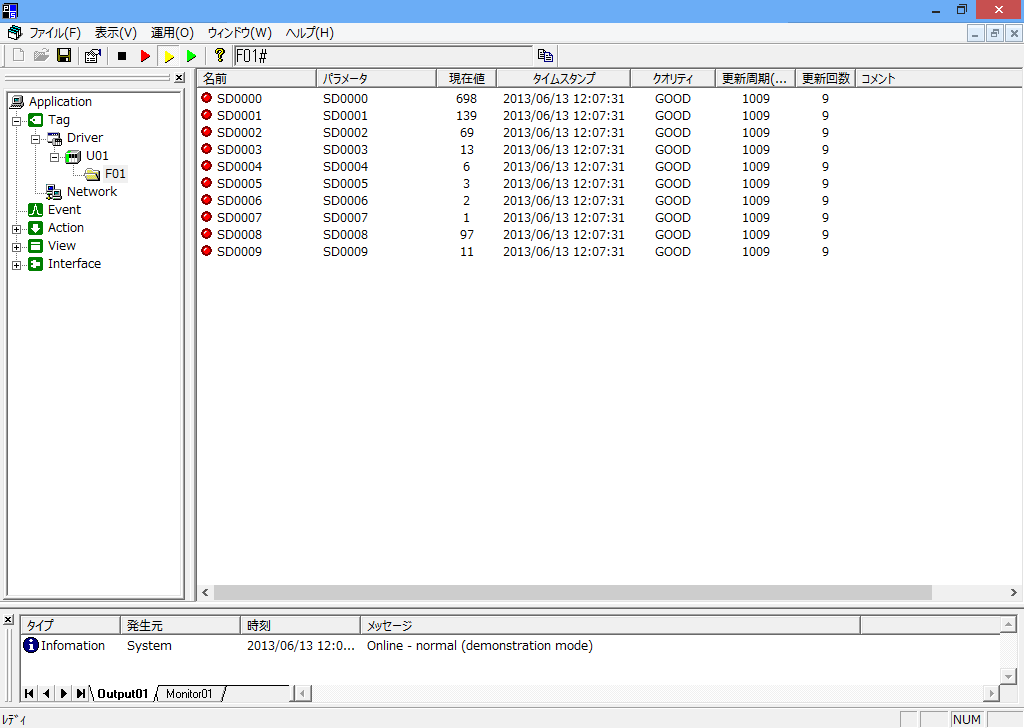
Furthermore, only the screen portion is created in Panel Editor, and when using various server-side functions, configuration work is done on the Panel Server side. The specific workflow is to first set up the communication connection with PLC, register tags, and configure actions and events on the Panel Server side. After that, you can create the screen in Panel Editor.
The main functions built with Panel Server are as follows:
■Connection with PLC
Panel Server has built-in functionality for connecting to approximately 100 types of PLC, providing high-speed and stable communication functionality. Simultaneous connection to multiple units and different types of PLC is possible.
For information on connecting to PLC, please refer to "Equipment Connection Guide".
■ Tags
A tag is a data storage area that acts like a "variable" in a development language. Signals are also exchanged between the screen and the PLC via tags.
For information on the
tag, please refer to "Tag Edition".
■Events
The trigger for executing an action is called an event. Events include "Periodic event", "Scheduled event", and "Tag event". Each action is called when the conditions defined in the event are met. In most cases, actions and events are defined as a set.
For information about events, please refer to "Events".
■Action
Actions are various logics executed on the Panel Server side. Typical functions such as alarms and logging are also provided by actions. In addition, there are many unique and practical functions such as "tag bridge", "Batch transfer", "Send mail", "FTP transfer", "Execute SQL", and "launch external application".
For information on actions, please refer to "Action Edition".
■ View
In addition to the screen display by
Panel Browser, there are simple monitoring functions on the Panel Server side, such as "Tag Monitor" which displays a list of tag values, and "Output View" which displays the system operation log. These server-side screen functions are called "views".
For information on views, please refer to "Views".
■ Interface
FA-Panel has many communication interfaces such as "OPC", "DDE", "IPLink", etc. For example, if you want to connect to a PLC of a manufacturer or model that is not supported by FA-Panel, you can also connect to an OPC server made by another company via OPC communication.
For information on the interface, please refer to "Interface".
|
IPLink is our proprietary communication protocol. By using IPLink, for example, you can access tags on Panel Server from an application developed with VisualBasic, or link tags between multiple different Panel Server. For more information on IPLink-Interface, please refer to "Interface Edition". |

|
You can start Panel Server in development mode (edit mode) by adding the "/editor" option when starting it from a shortcut, etc. If you want to edit the settings of Panel Server while it is operating online, you can edit the settings by starting it in edit mode separately from the online Panel Server. |