About Browser tag
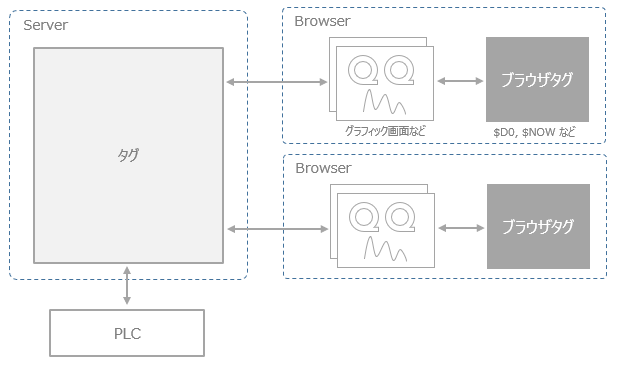
Browser tag are tags that can only be used within Panel Browser and can be used in the same way as normal tags from binds and scripts. Browser tag can be used for internal processing such as temporarily storing values on the screen. There are also tags that store the current communication status of the system and the status of the user level. For example, Browser tag such as "$SYS0", "$SYS1", and "$SYS2" store the communication connection status with Panel Server. By referencing these Browser tag from bind expressions, the communication status of the system can be easily displayed on the screen. Note that Browser tag has a value as independent information for each client, so values are not shared between clients.
For more information about the devices provided as Browser tag, see "Browser tag" in Appendix.
|
In older versions, this tag was called an "internal tag", but it has now been replaced by "Browser tag". |
