Checking duplication
Both the main and sub Panel Server constantly check each other's existence via a redundant communication line. This existence check process is performed using our proprietary protocol based on TCP/IP. Specifically, they periodically check each other's existence, and if there is no response, they assume that the other party has stopped for some reason.
Under normal circumstances, the sub Panel Server is in standby mode, and communication with PLC and various actions are handled by the main Panel Server. If the sub Panel Server is unable to confirm that the main Panel Server is alive, the sub Panel Server that was on standby until then will automatically be promoted to main and will start communicating with PLC and processing other actions.
Dual communication lines
Up to two communication lines can be set up for duplex processing: "Duplex communication line 1" and "Duplex communication line 2." By using two communication lines for redundancy, the reliability of duplex processing can be increased.
The recommended configuration when using two redundant communication lines is a network configuration using multiple LAN cards. In this configuration, each communication line is set to use a different LAN card.Communication between Panel BrowserBy configuring the communication paths for the redundant processing and the primary LAN card to use separate LAN cards, you can create a highly reliable redundant configuration.
Basic Settings
The basic settings for the Redundancy interface allow you to configure the following items:
Interface Specifications |
|
|---|---|
Basic Settings |
▪Duplex communication line 1 ▪Duplex communication line 2 |
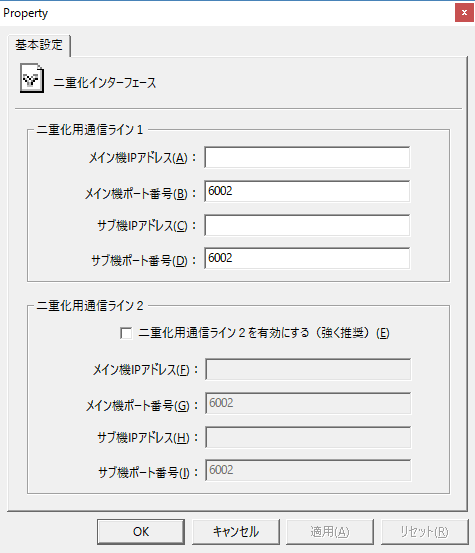
The Redundancy interface
The Redundancy interface provides System tag.
For details on System tag, see "System tag" in Appendix.