Network tag
|
This function "Network tag" is an old-style function that remains for backward compatibility with older versions. If you want to link with other Panel Server tags via the network, please use the higher-level function "IPLink Server" unit unless there is a special reason. Specifically, enable IPLink-Interface on the Panel Server that is the server side that has the actual tag to be linked, and register a IPLink server unit on the Panel Server that is the client side that links to that tag, and set it up to reference the server-side tag. For more information about IPLink, please see ``Using as a IPLink server'' and ``Using as a IPLink client''. |

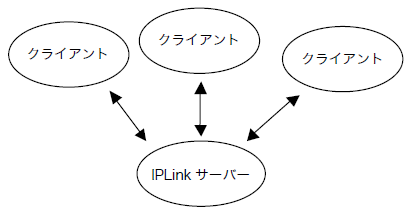
Using Network tag, you can share tags on a IPLink server in a TCP/IP network environment.
To share tags with Network tag, the application that owns the tags must be running as a IPLink server.
Tags on the IPLink server can be shared from multiple clients via Network tag.
The hierarchical structure of Network tag is two-level.
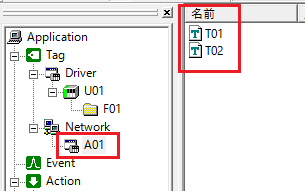
▪application
Defines which application (IPLink server) to connect to.
▪tag
Define which tag on the
IPLink server you want to connect to. Specify the tag defined in the IPLink server by tag path (for example, set "U01.F01.T01" or "U01.F01.T02").
Note that when referencing Network tag, the tag path will be a string consisting of the application and tag connected with a "/" (slash) (note that this is not a period like in normal tag paths).
Example: A01/T01
|
To start it as a IPLink server, you need to define IPLink-Interface. |
