Connecting the License Key
There are two types of licenses: standard license (USB license) and online license. When you purchase a standard license version of FA-Panel, you will be provided with one license key (USB key). The license key must be connected to the PC when using the application.
*The following ID is assigned to the license key.
product |
ID |
FA-Panel6 1 client version |
FA-Panel6 1CL |
FA-Panel6 10 client version |
FA-Panel6 10CL |
FA-Panel6 20 client version |
FA-Panel6 20CL |
FA-Panel6 30 client version |
FA-Panel6 30CL |
On the other hand, online licenses are subscription-based licenses that are authenticated via the Internet. They can also be used in cloud environments where USB type license keys cannot be used. For more information about online licenses, please refer to the FAQ on our website: "What is an online license?
About Restricted Mode
FA-Panel consists of three applications: Panel Server / Panel Editor / Panel Browser. Of these, a license key (USB key) is required to operate Panel Server. If the license key is not connected, Panel Server will start in restricted mode. The restriction of restricted mode is that the continuous operation time in online mode is limited to two hours. If the time limit is exceeded, it will automatically switch to offline mode, but you can manually switch it back to online mode. All other functions can be used exactly the same as in normal mode.
|
Development work can be done in limited mode, which means that even if you have only one license key, multiple engineers can work on multiple PCs in parallel. |

Number of clients
When running FA-Panel, you must connect a license key (USB key) to the PC on which Panel Server is running. If you start Panel Server with the license key connected, you can connect to Panel Server from multiple Panel Browsers at the same time, up to the number of client licenses you purchased.
When calculating how many client licenses you need to purchase, count the number of Panel Browsers that will be connected to the Panel Server simultaneously, rather than the total number of PCs that will make up the surveillance system you are about to build.
The following explains this with some examples.
|
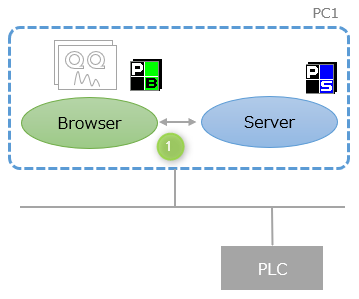
Panel Browser can run on the same PC as Panel Server, or on a different PC. The simplest system configuration is a standalone configuration with only one PC. In the case of a standalone configuration, the number of client licenses required is "1".
|
|
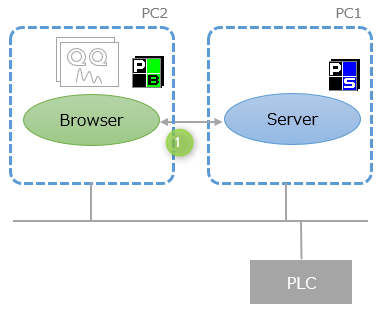
The system shown on the left is made up of two PCs, but Panel Browser and Panel Server are running on separate PCs. In this case, since only one Panel Browser connects to Panel Server at the same time, the number of client licenses required is "1".
|
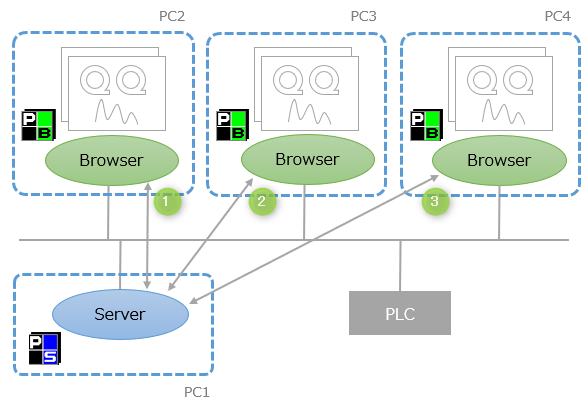 |
For example, if you connect a 10-client license key, you can connect to Panel Server from 10 Panel Browsers at the same time. In the example on the left, there are four PCs in total, but three client PCs are running one Panel Browser each. In this case, the number of client licenses required is "3".
|
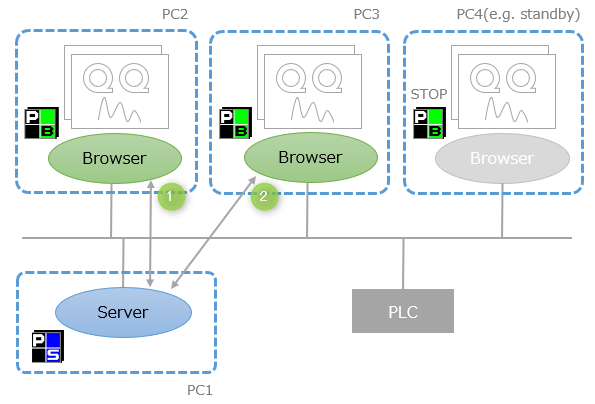 |
In the example on the left, Panel Browser is installed on three PCs, but only two of them are running at the same time, and one is stopped. In this case, the number of clients consumed is "2".
|
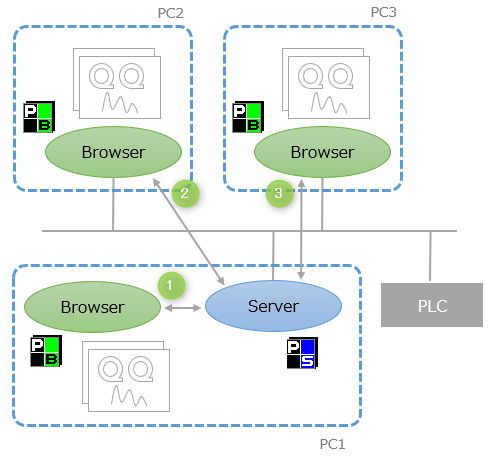 |
Even if Panel Browser is started on the same PC as Panel Server, it will still consume a client license. In the example on the left, the required number of clients is "3".
|