Application Configuration
FA-Panel consists of three applications: Panel Editor, Panel Browser, and Panel Server.
|
Panel Editor |
Panel Editor is an editing tool for creating screens. Use this tool to create graphic screens. Screen information created with Panel Editor is saved in a "client configuration file" (XML format). |
|
Panel Browser |
Panel Browser is a client application for running the screen as a runtime. It reads the "client configuration file" created with Panel Editor and executes it at runtime. |
|
Panel Server |
Panel Server is a server application used for communication with PLC and for processing alarms, data logs, reports, etc. Panel Server configuration information is saved in a "server configuration file" (text format). Panel Browser connects to Panel Server to obtain PLC signals, alarm information, history information, etc. Multiple Panel Browser can connect to one Panel Server at the same time. Panel Server must always be running during operation. |


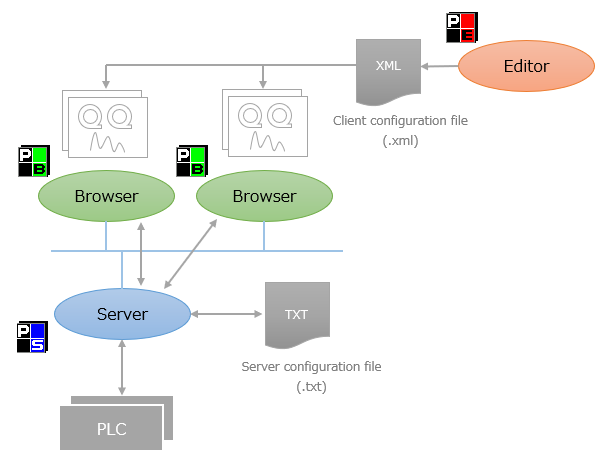
Furthermore, Panel Server and Panel Browser can run on the same PC or on separate PCs.