Enable automatic restart of Panel Browser
Panel Browser has a mechanism to automatically restart the application if it terminates abnormally.
This setting is configured by editing the “KeepProcess” root property from Panel Editor.
1.From Panel Editor, open the desired project (or client configuration file).
2.From the root properties, select the "KeepKrocess" property in the "Browser" group.
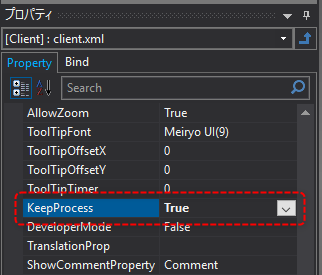
By setting the above to True, Panel Browser will be automatically restarted if Panel Browser terminates abnormally.