Speech control

<< Click to Display Table of Contents >>

Manual > Control Reference > Other >

Speech control


Speech control (Speech)


Speech control is a control that reads text aloud.


cr_0115


Checking the Text-to-Speech driver


Speech control requires a driver to read text to speech.

The driver is installed as standard on WindowsOS, but if you want to read out other voices, you will need to add a separate driver.

The sample is capable of playing standard audio from WindowsXP to Windows 8 (drivers may not exist depending on the manufacturer).


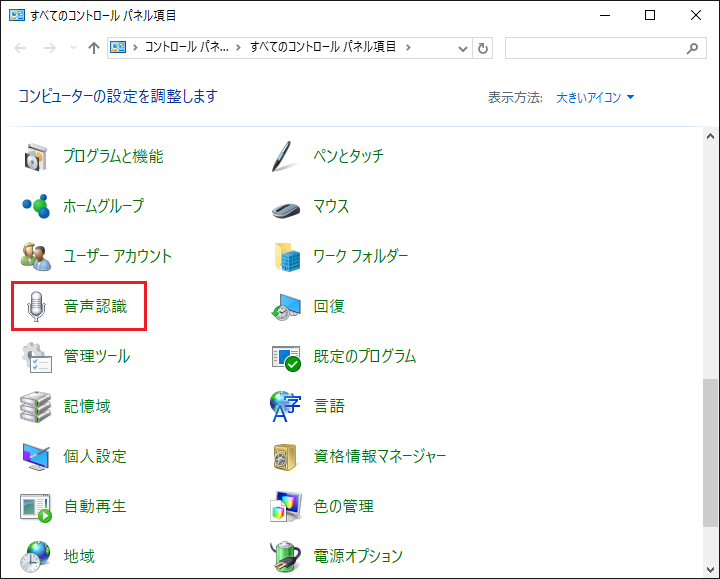
You can check the audio driver in the Control Panel under "Speech Recognition."


cr_0116


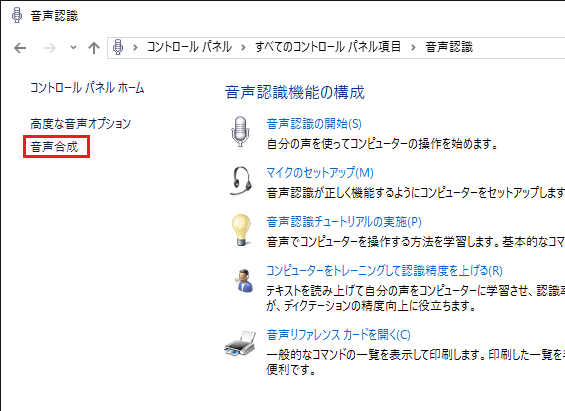
Select Text-to-Speech.


cr_0117


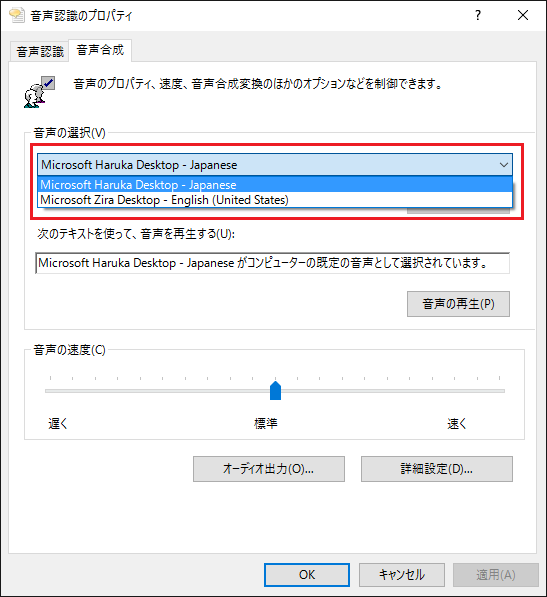
Check the audio selection.


cr_0118


About the Japanese speech synthesis driver


WindowsJapanese audio drivers are installed as standard on OS 8 and later (drivers may not exist depending on the manufacturer).

For older operating systems such as Windows 7, the Japanese audio driver is not installed as standard, so you will need to add it separately.

For example, download and install "Microsoft Speech Platform" released by Microsoft.