Registering tags
There are two ways to create a tag:
1.Using a tag settings file
2.Method
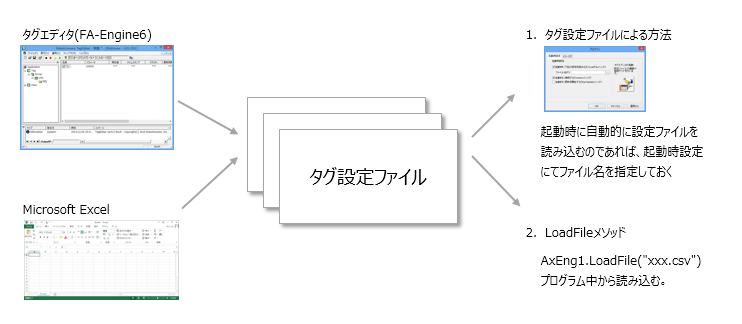
1.Registration via tag setting file
This method involves creating a tag settings file in advance with a tag editor and then loading it from within a VisualBasic program. To load using this method, use the "LoadFile" method. For example, you can prepare multiple tag settings files and switch between tag settings at any time from within a program. In addition to loading using a method, you can also specify that the settings file be loaded automatically when the application starts. This setting can be made in the "Startup Settings" property page of FA-Engine.
2.Individual registration by method
You can freely register tags from within a program using methods such as AddTag/DelTag. This method allows you to add and delete tags as desired even after loading a tag setting file. You can also refer to the information on tags that have been set from a program by using methods such as GetTagName/GetTagParam.
Tag Settings File Format
The setting file saved by Tag Editor is a text file in XML format. In addition to tag setting information, the setting file also contains the tag editor's own setting contents. The setting file format is compatible with FA series applications such as "FA-Server"/"FA-Panel", and can also be edited directly with a text editor.
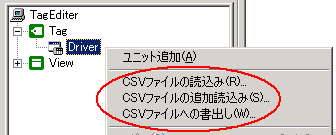
If you simply want to edit the tag information, there is a function to export and import the tag settings in CSV file format. The CSV file exported with this function can be directly edited in Excel and then imported again, making it a convenient function when editing a large number of tags.
Tag Path
Tags are set in the following three levels:
•Unit: U01 etc. •Folder: F01, etc. •Tags...T01 etc. |
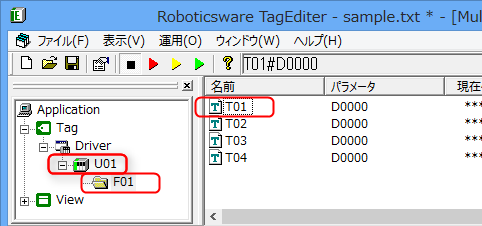 |
You need to specify a tag path for methods such as ReadVal / WriteVal / GetVal / SetVal. A tag path is a string that connects three levels with a "." (period) as shown below.
AxEng1.ReadVal "U01.F01.T01", value ※The underscore is the tag path |
You can also omit the first half of the tag path all at once by using the AccessPath property.
AxEng1Eng1.AccessPath = “U01.F01.” AxEng1Eng1.ReadVal “T01”, a AxEng1Eng1.ReadVal “T02”, b AxEng1Eng1.ReadVal “T03”, c AxEng1Eng1.ReadVal “T04”, d |