Important Interfaces
The table below lists only important interfaces. For other interfaces, please refer to “Reference”.
Most important column 〇: Communication is possible using only these Items without a circle: Important in some cases Items not listed in the table: Not essential but useful |
Important Items without a circle: Important in some cases Items not listed in the table: Not essential but useful |
Method Properties |
Most Important |
important |
|
■ Communications |
|||
Connect/disconnect to PLC. |
|
○ |
|
Start/stop automatic cache refresh. |
|
○ |
|
Read the value. |
○ |
○ |
|
Read the values of multiple tags. |
|
○ |
|
Write a value. |
○ |
○ |
|
Write the values of multiple tags. |
|
○ |
|
Reads a tag value from the cache. |
○ |
○ |
|
■ Tag registration/cancellation |
|
|
|
Register the unit (PLC). |
|
|
|
Unregister the unit (PLC). |
|
|
|
Register a folder. |
|
|
|
Unsubscribe from a folder. |
|
|
|
Register a tag. |
|
|
|
Unregister a tag. |
|
|
|
Delete all units, folders, and tags. |
|
|
|
Read/write tag settings files. |
|
|
|
■ Error handling |
|||
The most recent error code that occurred. |
○ |
○ |
|
The most recent error message that occurred. |
○ |
○ |
|
event |
|||
Occurs when value and value quality change. |
|
○ |
|
Occurs when the value changes. |
○ |
○ |
|
Occurs when the bit turns on. |
|
|
|
Occurs when a bit goes Off. |
|
|
|
Occurs each time periodic communication for automatic updates is completed. |
|
|
|
Occurs when the unit's device down state changes. |
|
○ |
|
An event that occurs when an error occurs. |
○ |
○ |
|
General program processing flow
The general programming process is as follows:
|
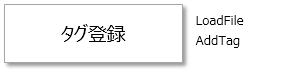
Register a tag. Tags are set in the tag editor. You can also add tags directly from within a program using the AddTag method. |
 |
|
|
Connects to PLC. The connection word enables communication methods such as ReadVal/WriteVal. |
|
|
|
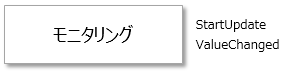
Calling the StartUpdate method will start the automatic update and when the value changes, the ValueChanged event will be raised. |
|
|
|
Reading and writing are done by calling methods. On-demand reading and writing in response to button operations can be done this way. |
|
|
|
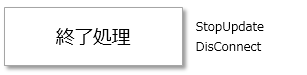
Normally, you do not need to worry about closing the form, as the termination process is performed automatically when you close the form. |