Connection Handling
Connection with PLC is performed using the Connect method. Communication with PLC using ReadVal/WriteVal etc. can be performed after calling the Connect method. Furthermore, by checking "Perform connection automatically" in the startup settings of the "FA-Engine" properties, the Connect method will be called automatically.
▪Notes on open processing
The
Connect method performs the initial processing for communication. For example, for an RS-232C connection, the COM port is opened, and for a Ethernet connection, the socket is opened. These are processed for each unit, so if duplicate RS-232C ports are set from each unit, only one unit will be active. This behavior also occurs when multiple "FA-Engine" controls are pasted and set up with the same configuration.
How to read values
There are three ways to load data:
1.Use the event
ValueChanged events, etc.
2.Use cache
GetVal Method
3.Direct Communication
ReadVal Method
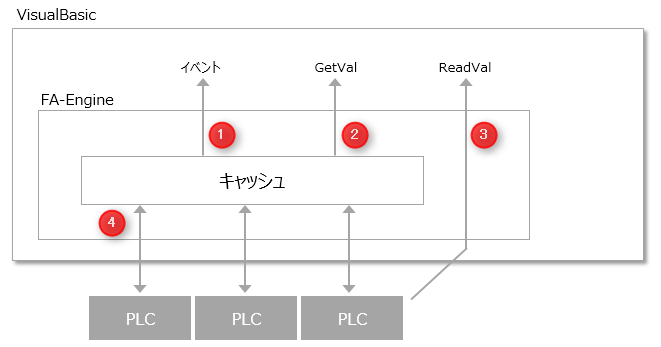
"FA-Engine" has a cache for temporarily storing tag values. Automatic cache update ④ is started by the StartUpdate method. The latest value is written to the cache periodically by automatic update, and when the value changes, an event such as ValueChanged occurs as in ①. The cache value can also be obtained by the ②GetVal method. This periodic communication (polling) for automatic update is performed in a separate task, so it does not interfere with the operation of VisualBasic and is ideal for implementing monitoring processes. The automatic update period is set in the folder properties.
Additionally, the ③ReadVal method does not reference the cache, but obtains the device value by direct communication with the PLC each time the method is called. Therefore, the response speed is slower than GetVal, but it is possible to obtain the latest data. This method is suitable for implementing control involving synchronization or batch-like write processing.
Below are the conditions and features of each reading method.
Communication Method |
Features |
StartUpdate |
event (Recommended for monitoring) |
Obtaining values through events is suitable for monitoring. Communication for automatic updates is performed in a different task from VisualBasic, so it does not interfere with the operation of VisualBasic. However, since values are always obtained from the server at regular intervals, the communication load may increase if there are a large number of tags. In such cases, please adjust the update cycle to slow down. |
Required |
GetVal (Normally, recommended) |
Getting a value from the cache using GetVal is characterized by its fastest processing speed. If you want to get a value quickly in VisualBasic, this method is recommended. |
Required |
ReadVal (Recommended for control and batch processing) |
This method takes the longest processing time to obtain values. It forcibly requests communication with the PLC, which may affect other communications. However, since the actual results of communication with PLC are returned for each request, the most recent device values can be obtained. Also, if there are a large number of tags and communication frequency is low, the communication load between the server and PLC can be reduced. Therefore, this method is ideal for control that requires synchronization with PLC or for batch-like communication. |
no need |
By selecting from these three communication methods according to the system requirements and sometimes combining them, you can improve communication performance. On the other hand, please note that performance may be degraded depending on the combination.
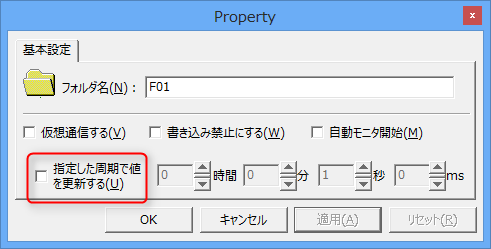
For example, the combination of periodically reading a tag with StartUpdate and then further communicating with ReadVal is an example that will result in the lowest performance. This will result in periodic communication + direct communication, which will unnecessarily increase the communication load for unnecessary periodic communication. Also, to achieve higher performance, register tags that require periodic communication in separate folders from other tags. Then, for folders that do not require periodic communication, uncheck "Update values at specified intervals."
If you are not particularly concerned about these communication methods, we recommend that you automatically update all tags using the StartUpdate method and obtain values using a combination of the GetVal method and the ValueChanged event.