Features of this action
browserFrom File transfer control,serverYou can instruct this action on the other side to send or receive files.
For details, please refer to "File transfer control" in the control reference.
Action Settings
The settings for this action are explained below.
Action specifications
|
Parameters
|
none
|
dialog
|
■File server
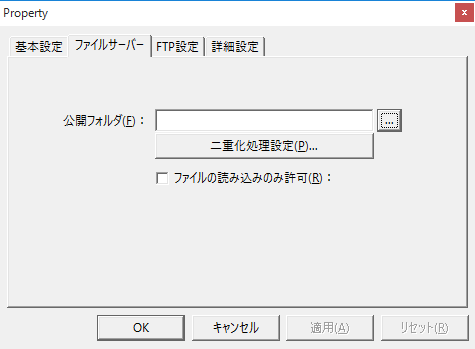
▪Public Folder
Set the folder to be published as
File server.
▪Duplex processing settings
Duplicates processing requests from the following Panel Browser methods.
ReceiveFile / SendFile / CopyFile / CopyFileTime / RenameFile / DeleteFile / MakeFolder / CopyFolder / RenameFolder / DeleteFolder
For example, when you execute CopyFile, copying is performed to both the main and sub folders. If writing to one of the files fails, the file will be automatically restored when the disconnected state is restored. For example, if the file sent with SendFile can only be written to one of the drives, either the main or sub, the file will be automatically copied to the drive that could not be written to when the drive that could not be written to is restored.
▪Allow only reading of files
If you check this setting,browserYou can provide read-only access to the folder from

|
If you check "Enable duplication" and do not check "Allow reading of files only," files will be synchronized between the main folder and subfolder. If you set it to "C:\" or specify the project folder as the public folder, for example, it may cause problems such as unintended synchronization of a large number of files constantly operating or system files becoming corrupted, so please set it with care.
|
|
|
■FTP settings
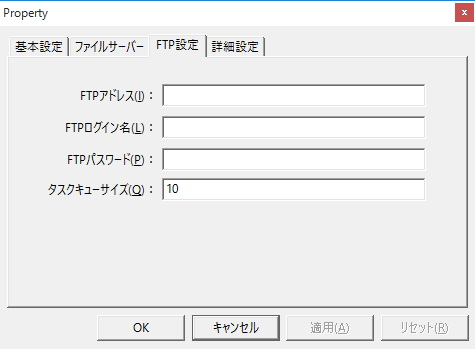
▪FTP address/FTP login name/FTP password
When using File transfer control, if you want to set FTP on the action side, set it. In that case, when connecting, in the browser's File transfer control, call it "FTPSetServer("", "", "")" without arguments.
▪Task Queue Size
When using the
FTPReceiveFile/FTPSendFile method and RequestID is set to 1 or greater for asynchronous communication, this specifies the maximum number of FTPReceiveFile/FTPSendFile calls that will be accepted simultaneously.
|