Set the visual theme to a fixed value
Some of the display color properties of controls attached to a form and some of the border styles (BorderStyle for buttons, etc.) are specified by default with the @color format name of the visual theme.
If for some reason you do not want to use the @color format names in the visual theme, in addition to manually replacing each property with an RGB value, you can also convert them all at once to a fixed value by following the steps below.
1.From Panel Editor, select the control you want to convert.

If you look at the properties after pasting, you will see that @color format name is set.
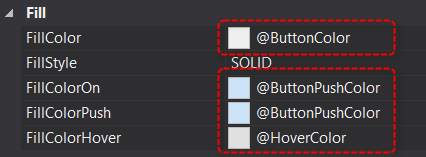
2.Right-click the control you want to convert to display the menu and select "Make visual theme fixed."
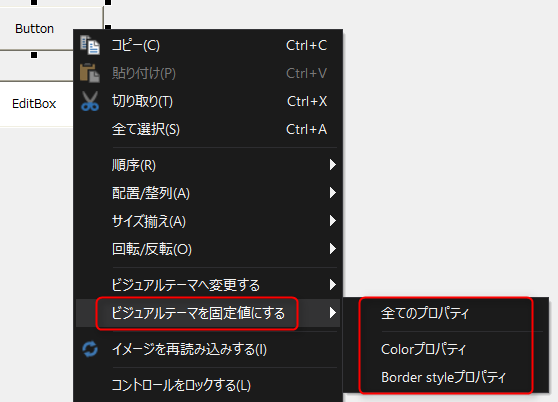
From the submenu, select the action you want to perform. To change all properties, select "All Properties."
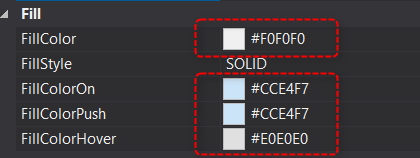
After execution, if you look at the property page, you will see that the @color format names in the visual theme have been replaced with RGB values.
For the properties of each control, the @color format name properties whose default values are in the visual theme can be converted to the visual theme all at once by following the steps below.
1.From Panel Editor, select the control you want to convert.
If you look at the properties, you will see that a fixed value is set, rather than a @color format name.
2.Right-click the control you want to convert to display the menu and select "Convert to Visual Theme."
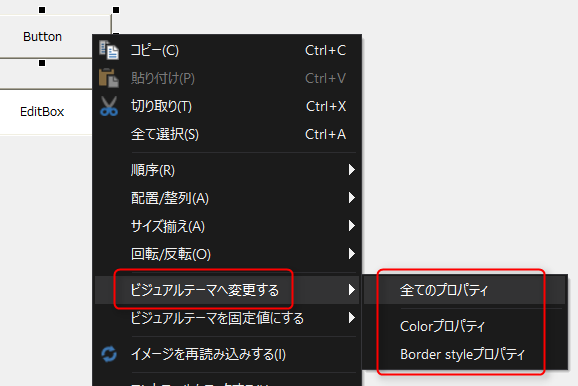
From the submenu, select the action you want to perform. To change all properties, select "All Properties."
After execution, if you look at the property page, you will see that the RGB values have been replaced with the @color format name of the visual theme.