Form names
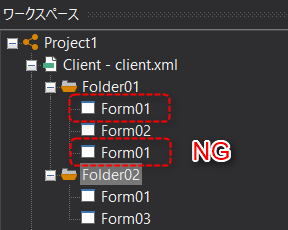
Form names must be unique within the same folder in the same client.
If there are forms with the same name in the same folder, specifying a duplicate form name with the OpenForm method, etc., will display the form that was detected first. We cannot guarantee which of the duplicate forms will be displayed. Even if you save a client configuration file with duplicate form names, no error message will be displayed (*However, if the LocaleLanguage property of the form is set appropriately for internationalization, forms with the same name can be mixed in the same folder. For details, see the following hint.).
Furthermore, if forms are stored in multiple folders, you can specify the folder name and form name separated by a period as arguments to the OpenForm method to identify and display the form in the specified folder. Even if form names are duplicated between folders, the desired form can be displayed.
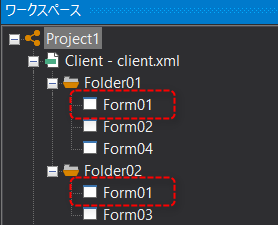
(Example of OpenForm)
event OnMouseUp(button)
{
	::OpenForm("Folder02.Form01");
}
|
In Ver6 and later, it is now possible to specify the folder name as a parameter in the OpenForm method, etc. |

|
From Ver6 onwards, it has become possible to manage forms with the same name in separate folders. For information on how to open a form by specifying the folder name, please refer to the description in "About form names and view names". |
|
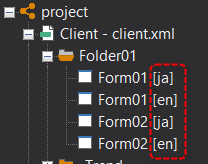
The "LocaleLanguage" property is provided for root and form as a property for internationalization. When supporting various languages, if you prepare forms with the same form name and set the desired locale in the LocaleLanguage of each form, when the screen is called up using the OpenForm method, the form with the same locale as the root LocaleLanguage setting will be automatically selected and displayed.
Furthermore, forms with LocaleLanguage set will be displayed in the Panel Editor tree with a locale ID such as [ja] as shown below.
For more information about internationalization, see Locales.
|
Relationship between forms and folders
A form must always be created under a folder.
When you open a client tree from the workspace, there will always be one or more folders, and the form will be created under one of the folders.
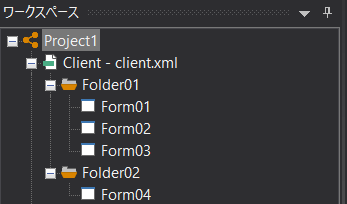
Folder names must be unique within a client and must not be duplicated.
In addition, folders can only have one level. You cannot create a folder under a folder.
|
You can copy multiple forms at once by folder. For example, when copying forms between Panel Editors while multiple Panel Editors are running, you can process them all at once by folder. |