About system formats
This page explains the specifications regarding the "system format" of date and time format.
The system format for date and time is the date and time format that is pre-prepared within the FA-Panel system.
The system formats available are as follows:
(System format type)
type |
Date and Time Format Name |
Contents |
@DATETIME |
This is the default format (recommended). This format inherits all the properties of @LOCALE internally, and will behave the same as @LOCALE unless customized by a user format.
|
|
@ISO |
The standard format (@ISO) is a universal format that is not affected by locale. The format is equivalent to "%Y-%m-%d %H:%M:%S". Example) 2017-02-12 11:10:09
|
|
@LOCALE |
If you specify this format, the operation will be in accordance with the locale setting set in the Locale root property (or the LocaleDateTime root property).
|
|
@ja, @en, etc. |
This format is used when you want to directly specify a country-specific format, regardless of the Locale root property setting. To specify, use the locale ID that indicates the country, such as ja (Japan) or en (English), after "@".
|
When specifying the date and time format using the system format, you can specify it by adding any option to the end of the date and time format name such as "@DATETIME".
By adding options, it is possible to define more detailed operations.
Example: If the OS language setting is Japanese and the Locale property of root is "DEFAULT"
@DATETIME ・・・ 2017/02/18 12:57:20
@DATETIME.D 2017/02/18
@DATETIME.D.%HM ・・・ 2017/02/18 12:57
For more information about options, see "Date and time format options and properties".
Format: @DATETIME[.option format]<property format>
The default format "@DATETIME" internally inherits the specifications of @LOCALE and will behave the same as @LOCALE unless customized by a user format definition (overridden by the DateTimeFormatConf root property).
Date and time format examples |
Display example |
@DATETIME |
2017/02/18 13:55:42 |
@DATETIME.D |
2017/02/18 |
@DATETIME.T |
13:55:42 |
@DATETIME.%ymdHM |
17/02/18 13:55 |
@DATETIME.%mdHMSt |
02/18 13:55:42.125 |
@DATETIME.%HM |
13:55 |
@DATETIME.D.%HM |
2017/02/18 13:55 |
@DATETIME.T.D |
13:55:42 2017/02/18 |
@DATETIME.DT.MS |
2017/02/18 13:55:42.125 |
@DATETIME.DT.UTC |
2017/02/18 13:55:42 +0900 |
*The display example in the above table is an example when the OS language setting is Japanese and the Locale property of root is "DEFAULT".
*The above table shows just some examples. By specifying other options, you can support a variety of formats. For details about options, see "Date and time format options and properties".
|
@DATETIME and @LOCALE behave exactly the same in the initial state, but they are provided as separate formats in anticipation of user customization. For example, @DATETIME is also commonly used by part libraries and screen libraries, and if you want to change the display of dates and times collectively, you can customize the behavior of @DATETIME in the definition of the DateTimeFormatConf root property, allowing you to change the overall behavior collectively. From the perspective of extensibility, we also recommend using @DATETIME to specify the date and time format used by the user, unless there is a special reason not to do so.
For details on customizing @DATETIME using DateTimeFormatConf, see "Date and time format (user format)".
|

|
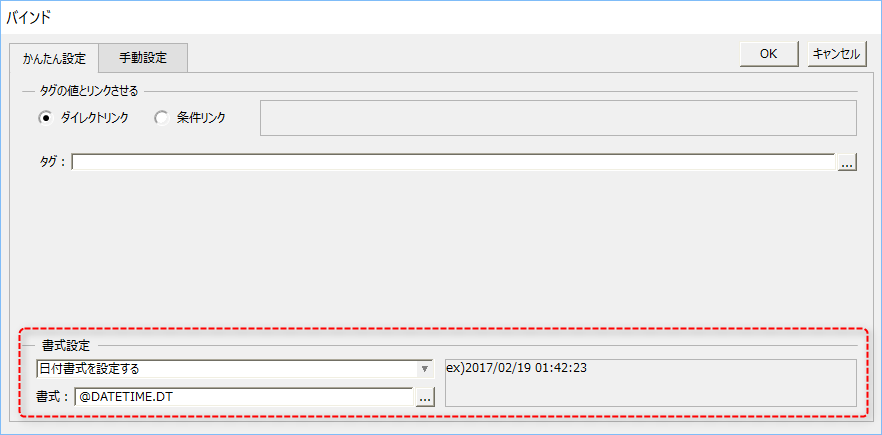
The binding dialog displayed in Panel Editor gives you a quick overview of how your date and time format definitions actually work.
Below is an example where the format is set to "@DATETIME.DT.%g;<TZ=New Zealand Standard Time;DST=smr>".
*As this is a simple test, test results may not be displayed for some options.
|

|
When specifying a format, you can specify multiple properties by separating each property with a semicolon, like so: When listing <> pairs, make sure not to put any characters between the <> (spaces are also not allowed).
Example) @DATETIME.%YmdHMSps<AM=am.><PM=pm.><DTSep=^><TZ=US Eastern Standard Time>
*The above example is equivalent to the following: @DATETIME.%YmdHMSps<AM=am.;PM=pm.;DTSep=^;TZ=US Eastern Standard Time>
|
Format: @ISO[.Option format]<Property format>
The standard format (@ISO) is a universal format that is not affected by locale.
The display content is equivalent to "%Y-%m-%d %H:%M:%S".
Date and time format examples |
Display example |
@ISO |
2017-02-18 13:55:42 |
@ISO.D |
2017-02-18 |
@ISO.D.%HM |
2017-02-18 13:55 |
*The display examples in the above table will be displayed in the same way regardless of the OS language settings or the settings of the root Locale property (or LocaleDateTime property).
*You can also specify options for @ISO. For details about options, see "Date and time format options and properties".
Regional format (auto-switch) (@LOCALE)
Format: @LOCALE[.option format]<property format>
Regional formatting (automatic switching) operates according to the locale setting set in the Locale root property (or the LocaleDateTime root property).
For example, if you set the Locale root property (or the LocaleDateTime root property) to "DEFAULT", the display will follow the OS settings.
Alternatively, if you set the Locale root property (or the LocaleDateTime root property) to "en", the display will be in "en" (English) regardless of the OS settings.
Date and time format examples |
Display example |
@LOCALE |
2017/02/18 13:55:42 |
@LOCALE.D |
2017/02/18 |
@LOCALE.D.%HM |
2017/02/18 13:55 |
*The display example in the above table is an example when the OS language setting is Japanese and the Locale property of root is "DEFAULT".
*You can also specify options for @LOCALE. For details about options, see "Date and time format options and properties".
Regional format (fixed) (@ja, @en, etc.)
Format: @[Locale ID][.Option format]<Property format>
The fixed regional format directly specifies the locale using a "locale ID" that represents the region of each country, such as ja (Japan) or en (English).
Regardless of the setting of the Locale root property (or the LocaleDateTime root property) or the OS settings, the content will be displayed in the regional specifications of the specified locale ID.
Date and time format examples |
Display example |
@ja |
2017/02/18 13:55:42 |
@ja.D |
2017/02/18 |
@ja.D.%HM |
2017/02/18 13:55 |
@en |
02/18/2017 13:55:42 |
@en.DT.MS |
02/18/2017 13:55:42.123 |
@de |
18.02.2017 13:55:42 |
*For details about the locale IDs that can be specified in the table above, see "About locale IDs".
*You can also specify options for the fixed regional format. For details about options, see "Date and time format options and properties".
|
An example of when specifying the regional format (fixed) (@ja, @en, etc.) is effective is when you want to paste multiple clock parts onto a form and display the time in the locale settings of different countries side by side (you can also create a screen like a world clock by specifying an individual time zone for each clock part). |