Grid Paging
The grid provides paging functionality.
Paging allows you to divide the grid into any number of rows (or columns) and display it in units of that number. This function is particularly useful when you want to display data with a large number of rows or columns in a grid.
The image below shows what happens when you paging by row.
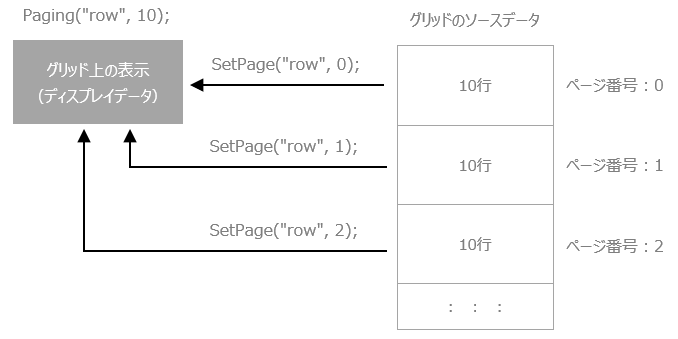
still,Paging can be used in conjunction with other filter features.You can use paging to further narrow down the display using other filters.
To paginate the grid, use the following methods:
Methods |
explanation |
This performs paging. In the first parameter, specify the type of "col" (column unit) or "row" (row unit), and in the second parameter, specify the number of rows (or columns) to display on one page.
|
|
Specify the page to display. Page numbers are sequential numbers starting from 0.
|
|
Gets the page number that is currently being displayed.
|
|
Gets the total number of pages in the current paging display.
|
|
Cancel paging.
|