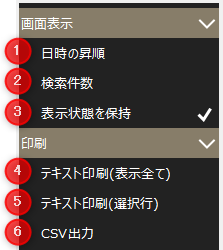
Event Real Time Settings Menu
# |
name |
explanation |
||||||
|---|---|---|---|---|---|---|---|---|
1 |
Date and time ascending
|
Switch the display order of the list between ascending and descending order of occurrence date and time. |
||||||
2 |
Number of searches |
Set the number of results to search. 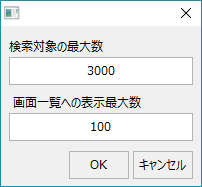
|
||||||
3 |
Maintain Visibility
|
The settings changed on the screen will be retained. Note that the settings are saved for each client.
|
||||||
4 |
Text printing (Show all) |
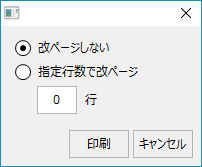
Events displayed in the event list can be output as a text file. Printing can be done using a text editor (such as Notepad).
Also, when outputting, a selection screen will be displayed for selecting how to handle line breaks. |
||||||
5 |
Text printing (selected row) |
The events selected in the event list will be output as a text file. Printing is done from a text editor (such as Notepad).
Also, when outputting, a selection screen will be displayed for selecting how to handle line breaks. |
||||||
6 |
CSV Output
|
The event list display content will be output as a CSV file.
|