Digital Clock
|
A digital clock is a device that displays the time. |
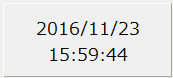
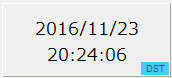
By selecting the time zone (_TimeZone), it is possible to display the date and time in various time zones, and daylight saving time display (DST display) is also supported.
You can freely specify the display format, such as year/month/date, month/date only, month/date/year, hour/minute/second, or hour/minute only.
Custom Properties
Tag configuration |
Input Tags |
_TagIn |
Specify the tag path of the tag for which you want to get the time to display. The client's time can be obtained with "$NOW". |
Display settings |
Time Zone |
_TimeZone |
Select a time zone. By specifying a time zone, you can display the time according to the individual time zone for each part. If you do not select anything (leave it blank), the root setting will be used. |
format |
_Format |
You can specify the date and time format for each row to be displayed. For details on date and time formats, see Date and time formats. |
|
Text Color |
_TextColor |
Specifies the color of the date and time. |
|
Background Color |
_BackPanelColor |
Specifies the color of the background panel. |
|
DST Settings |
DST Display |
_ShowDst |
Specifies whether to display DST. If enabled, when you specify a time zone with daylight saving time, the status will display whether the current time is daylight saving time or not. |
DST notation |
_DstText |
Specifies the text to display for the DST status (default is "DST"). |
|
Text Color |
_DstTextColor |
DST Specifies the text color for the status display. |
|
Background Color |
_DstFillColor |
DST Specifies the background color for the status display. |
Usage Example
1) Tokyo Standard Time
|
This is an example where the time zone is specified as "Tokyo Standard Time". The time will be displayed as UTC+09:00. |
2) New Zealand Standard Time
|
This is an example where the time zone is specified as "New Zealand Standard Time". The time will be displayed as UTC+12:00. Since it is Daylight Saving Time, the DST status is displayed. |