Sound enable/disable switch (button)
|
The sound enable/disable switch button is a component that switches sound select on/off.
|
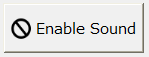
The sound stop button works in conjunction with Browser tag "$SOUND1".
Clicking this button will alternate between writing 0 (disabled) and 1 (enabled) to $SOUND1.
In addition, depending on the current sound enable/disable status, the icon on the button will switch between Icon 2 (enabled) and Icon 1 (disabled).
Custom Properties
setting |
caption |
_Text |
Specify the string to be displayed on the button. |
Confirmation screen display |
_IsConfirm |
When enabled, a confirmation dialog will be displayed when you operate the button. |
|
Confirmation message |
_ConfirmMsg |
Specify the confirmation message to be displayed on the confirmation screen. |
|
Display settings |
Icon 1 |
_IconFile1 |
You can specify the icon file to be displayed on the button (when disabled). The default icon is the System Resources icon "sys:prohibition_32.png". |
Icon 2 |
_IconFile2 |
You can specify the icon file to be displayed on the button (when enabled). The default icon is the System Resources icon "sys:sound_play_32.png". |
|
The sound enable/disable switch is used in combination with "Sound Select". |
