Lock setting for Panel Server stop operation
Stopping Panel Browser will not affect processes such as logging and aggregation, but stopping Panel Server will stop various processes taking place on the server.
To prevent an operating Panel Server from being stopped due to an operator error, you can configure the system to require a password to be entered when stopping Panel Server.
This setting can be enabled by following the steps below.
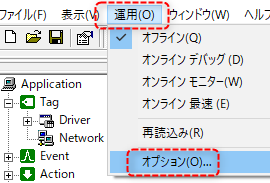
1.Select "Operation" and "Options" for Panel Server to display the settings screen.
2.From the "Stop Operation Lock" tab on the settings screen, make the following settings.
|
Check "Lock stop operation".
Set the unlock password.
|
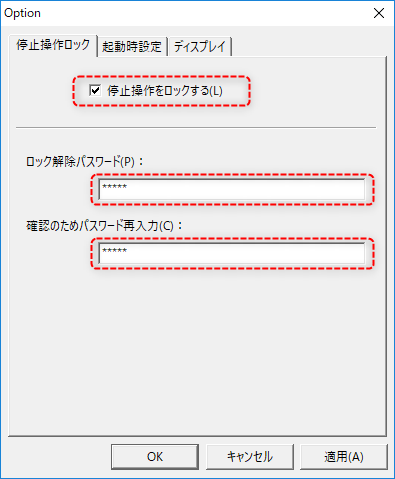
Once you have completed the configuration, click the OK button to save the settings.
In order for this setting to take effect, you must shut down Panel Server and then start it again.
|
Each setting item of "Stop Operation Lock" is not saved in the server setting file of Panel Server, but is saved in the OS registry as a system value. The settings are saved to the registry when you close Panel Server after pressing the "OK" or "Apply" button after setting each item. Therefore, after setting "Stop Operation Lock", be sure to close Panel Server once and then start it again to check that the settings have been reflected. |
