overview
The logging and aggregation function of standard projects built using the standard framework uses the "Summary (CSV)" action, but by using the Summary (ODBC) action, you can connect to a database via ODBC to perform logging and aggregation.
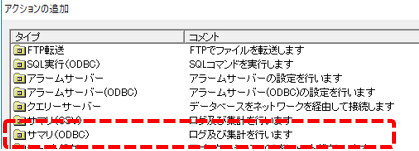
The daily report function of the screen library works exactly the same as when the summary action is ODBC as when it is CSV. Therefore, if you want to change the standard summary function from CSV format to a database, you can use the screen as is by simply changing the summary action to "Summary (ODBC)" and configuring it.
The method for changing the summary action from CSV to ODBC is the same as that described in "Changing the summary action from CSV to ODBC" in the trend graph. Please refer to that for details.
|
The latest information on supported database types, versions, etc. can also be found in the FAQ on our website, "What database products are supported?". |
