|
Remote query database(SQL) control (RemoteQueryDB)
Remote query database(SQL) control is a control for retrieving data from and writing data to a database using SQL.
Connect to the database through the server(For compatible databases, see here).
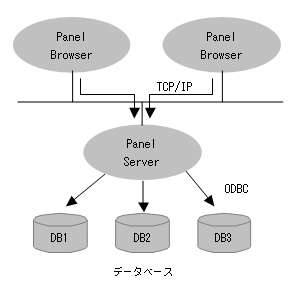
Since you connect to the database via the server, you only need to configure ODBC on the PC that runs the server.
There is no need to configure ODBC on each PC that runs a browser.
In addition, since communication between the browser and server is via Internet Protocol (TCP/IP), you can access the database from any environment.

|
When retrieving a large amount of data, or other processing time is required, the process may fail due to a timeout. In such cases, adjust the PSTimeOut root property so that it is longer than the processing time.
|
|
In addition to this control, there is also Direct query database(SQL) control as a control for connecting to a database, but unless you have a specific reason to do so, please use Remote query database(SQL) control.
|
How to connect
Connecting to a database is done using the Connect method.
The Connect method supports two connection methods.
■ Syntax 1
Connect(AcrionName);
■ Syntax 2
Connect (DSN,DataBase,User,Password)
In Syntax 1, a connection is made by specifying the Query server action name defined on the server.
When connecting with Syntax 1, you need to set the Query server action on the server. For information on how to set it, see "Configuring Query server" in this section.
In Syntax 2, you directly specify the parameters for connecting to the database.
This method does not require any action configuration.
Note that there is a big difference in the concept of connections between Syntax 1 and Syntax 2.
In syntax 1, the Query server defined on the server will connect to the DB.
Even if you connect to the server from multiple browsers, there is only one connection to the DB.
When multiple browsers are connected, Query server synchronizes the data exchange with the database,
This may result in slightly slower performance than syntax 2, but it will put less strain on the database.
In the case of syntax 2, if you connect to the server from multiple browsers, the server will create a connection to the database for each browser.
Because it has multiple connections, even when connected from multiple browsers, it is possible to communicate with the database without synchronization, which may result in faster processing.
However, this will increase the load on the DB compared to Syntax 1.
|
Unless there is a specific reason, syntax 1 is recommended.
|
|
Configuring Query server
When connecting using the Connect method with syntax 1, you need to set the server Query server action.
Setting up Query server is easy.
1.Start the server
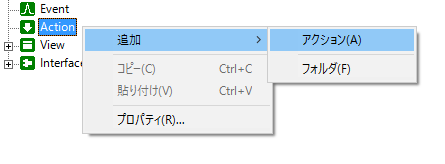
2.Right-click "Action" in the tree on the left and select "Add" and "Action" from the menu.
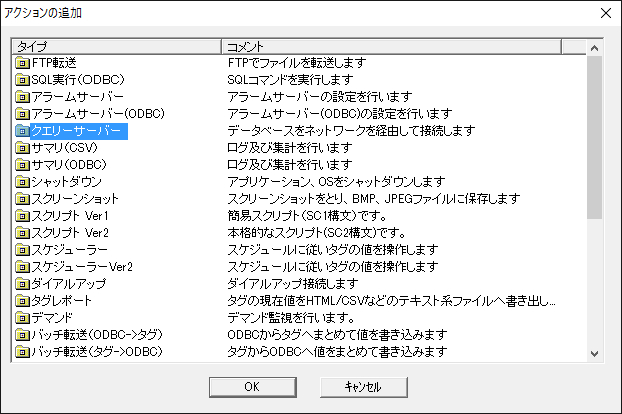
3.Select "Query server" from the Add Action dialog and press "OK"
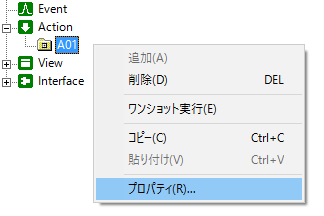
4.Right-click the created "A01" action and select "Properties"
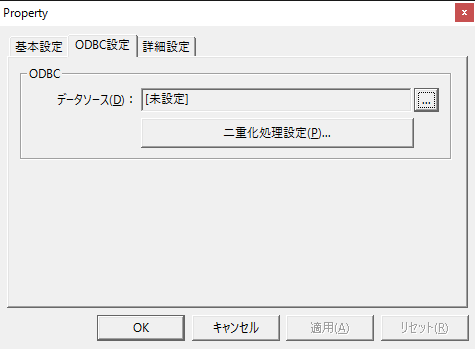
5.Select your data source in the ODBC Settings tab
For the ODBC settings,"ODBC Settings"Please refer to.
|
How to use the QuerySQL method
QuerySQL is an important method to execute SQL and retrieve records. We will explain it using the following table (table name "TABLE1") as an example.
ID
|
TESTNAME
|
TESTRESULT
|
TESTTIME
|
1
|
Test1
|
T
|
2005/1/1 12:30:00
|
2
|
Test2
|
F
|
2005/1/1 14:25:00
|
3
|
Test3
|
T
|
2005/1/1 15:15:00
|
|
var vFieldNum, vRecordNum, vFieldName, vFieldType, vData;
if (!this.QuerySQL("SELECT * FROM TABLE1", vFieldNum, vRecordNum, vFieldName, vFieldType, vData))
{
::OpenMsg(this.GetLastError()); // If it fails, display the error comment with GetLastError
return;
}
|
|
As in the above example, the SQL statement "SELECT * FROM TABLE1" is queried from the database using the QuerySQL method.
If the process is successful, the table information will be stored in "vFieldNum, vRecordNum, vFieldName, vFieldType, vData".
vFieldNum
|
The number of fields, 4, is stored.
|
vRecordNum
|
The number of records, 3, is stored.
|
vFieldName
|
The field names defined in the database will be stored as c("ID", "TESTNAME", "TESTRESULT", "TESTTIME").
|
vFieldType
|
The SQL type of each field is stored as c(4, 12, 4, -7, 11).
|
vData
|
Please see below.
|
vData stores the contents of all records as a two-dimensional array (vData[ column, row]).
This can be expressed in the script's c keyword as follows:
|
c( c(1,2,3),
c(“Test1”,”Test2”,”Test3”),
c(T,F,T),
c(#2005/1/1 12:30:00#, #2005/1/1 14:25:00#, #2005/1/1 15:15:00#));
|
|
To extract data for each cell, specify the array index as follows (indexes and matrices are counted from 0).
vData[ columns, rows]
|
var a = vData[0,0]; // Data in column 0, row 0 (1)
var a = vData[0,1]; // Data in column 0, row 1 (2)
var a = vData[1,2]; // Data in column 1, row 2 ("TEST3")
|
|
To extract a specific column of data from an array:
|
var a = vData[0, ]; // All data in column 0
var a = vData[1, ]; // All data in column 1
|
|
To extract a specific row of data from an array:
|
var a = vData[, 1]; // All data in the first row
var a = vData[, 2]; // All data in the second row
|
|
In addition, the script can handle various arrays. Below are some examples.
 Example
 1) vData[0, ] is the 0th column, that is, c(1,2,3).
Example 2) ::Math.Ave(vData[0, ]) is the average value of the 0th column, which is 2.
Example 3) vData [c(1,2), ] is the first and second columns, that is, as follows.
|
c( c(“Test1”,”Test2”,”Test3”),
c(T,F,T) );
|
Example 4) vData [c(2,1), ] is the second and first columns, that is, as follows.
|
c( c(T,F,T),
c(“Test1”,”Test2”,”Test3”) );
|
Example 5) vData [c(1,1) , ] is the first column and the first column, that is, the following.
|
c( c(“Test1”,”Test2”,”Test3”),
c(“Test1”,”Test2”,”Test3”) );
|
Example 6) vData [ , vData [3, ] > #2005/1/1 14:00:00#] retrieves records from "2005/1/1 14:00:00" onwards.
|
c( c(2,3),
c(”Test2”,”Test3”),
c(F,T),
c(”#2005/1/1 14:25:00#”,”#2005/1/1
|
Example 7) ::Math.Ave(vData [0 , vData [3, ] > #2005/1/1 14:00:00#]) retrieves records from "2005/1/1 14:00:00" onwards and calculates the average. In other words, the average value of c(2,3) is 2.5.
|
|
The ::Math methods are useful for aggregating table data. For example, the following will calculate the average, sum, maximum, etc. of each field:
For information on ::Math methods, see "Root Methods".
var a = ::Math.Ave(vData); //Average value
var a = ::Math.Sum(vData); // Sum
var a = ::Math.Max(vData); // Maximum value
var a = ::Math.Min(vData); // Minimum value
|
|
|