StartRealTime

<< Click to Display Table of Contents >>

Manual > Control Reference > Data > Histrical data graph control > Method >

StartRealTime


Real-time display starts.


Syntax 1

StartRealTime(

         mode

         [, interval = "1000ms"]

         [, startOffset = F]

         )


Parameters


mode


Type:

Selected characters


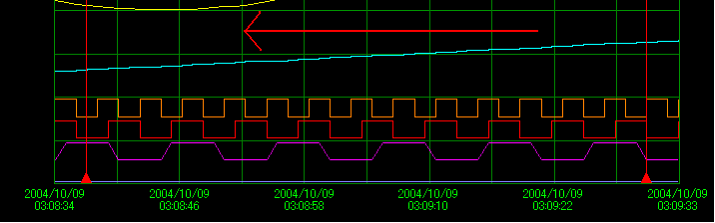
Scroll mode. Specify "scroll".


interval


Type:

character


This is the cycle for updating the screen. Set the time or the number of times. Please refer to the explanation.


startOffset


Type:

Boolean


TRUE - Starts real-time display from the currently set start time.

FALSE - Starts normal real-time display.


If mode is "scroll_", the screen will scroll from left to right with each update.

cr_0013


Syntax 2

StartRealTime(

         mode

         [, ratio = 1]

         [, interval = "1000ms"]

         [, startOffset = F]

         )


Parameters


mode


Type:

Selected characters


Scroll mode. Specify "page".


ratio


Type:

Number


Scroll percentage, specified from 0 to 1.


interval


Type:

character


This is the cycle for updating the screen. Set the time or the number of times. Please refer to the explanation.


startOffset


Type:

Boolean


TRUE - Starts real-time display from the currently set start time.

FALSE - Starts normal real-time display.


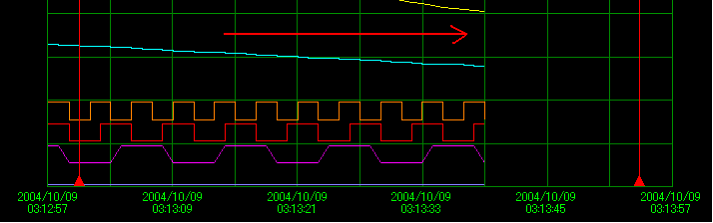
In the case of "page", the time is fixed and the graph line is drawn from left to right. The graph line will only scroll when it reaches the far right.

The scroll ratio is set by Ratio. ratio is 1 (100%) by default.

For example, if you set it to 0.8, the graph will scroll 80% when it reaches the far right (leaving only 20% of the graph to the left).

cr_0014


hmtoggle_plus1Explanation


reference