About the connection example
Please see below for an example of connection settings for this driver.
Applicable models etc. |
explanation |
This is an example of connection settings with the Q series via RS-232C.
|
|
This is an example of connection settings with the iQ-R series via RS-232C.
|
Device List
The compatible devices are as follows (see here for how to view the device list).
device |
keyword |
Start address |
explanation |
unit |
reading |
Writing |
Input Relay |
X |
000000 |
Hexadecimal |
bit |
○ |
○ |
Output Relay |
Y |
000000 |
Hexadecimal |
bit |
○ |
○ |
Internal Relay |
M |
000000 |
Decimal |
bit |
○ |
○ |
Special Relay |
SM |
000000 |
Decimal |
bit |
○ |
○ |
Latching Relay |
L |
000000 |
Decimal |
bit |
○ |
○ |
Annunciator |
F |
000000 |
Decimal |
bit |
○ |
○ |
Edge Relay |
V |
000000 |
Hexadecimal |
bit |
○ |
○ |
Link Relay |
B |
000000 |
Hexadecimal |
bit |
○ |
○ |
Special Link Relay |
SB |
000000 |
Decimal |
bit |
○ |
○ |
Step Relay |
S |
000000 |
Decimal |
bit |
○ |
○ |
Timer Contact |
TS |
000000 |
Decimal |
bit |
○ |
○ |
Timer coil |
TC |
000000 |
Decimal |
bit |
○ |
○ |
Integration Timer Contact |
SS |
000000 |
Decimal |
bit |
○ |
○ |
Accumulator timer coil |
SC |
000000 |
Decimal |
bit |
○ |
○ |
Counter Contact |
CS |
000000 |
Decimal |
bit |
○ |
○ |
Counter coil |
CC |
000000 |
Decimal |
bit |
○ |
○ |
Timer current value |
TN |
000000 |
Decimal |
word |
○ |
● |
Current value of the integration timer |
SN |
000000 |
Decimal |
word |
○ |
● |
Counter current value |
CN |
000000 |
Decimal |
word |
○ |
● |
Data Register |
D |
000000 |
Decimal |
word |
○ |
● |
Special Registers |
SD |
000000 |
Decimal |
word |
○ |
● |
Link Register |
W |
000000 |
Hexadecimal |
word |
○ |
● |
Special Link Register |
SW |
000000 |
Hexadecimal |
word |
○ |
● |
Index Register |
Z |
000000 |
Decimal |
word |
○ |
● |
File Register (Current block) |
R |
000000 |
Decimal |
word |
○ |
● |
File Register (Sequential number) |
ZR |
000000 |
Hexadecimal |
word |
○ |
● |
File Register (Sequential number) |
ZZR |
0000000 |
Decimal |
word |
○ |
● |
|
When specifying an address for a ZR (file register) in decimal notation, use "ZZR". |

About the access station
When connecting to the Q/L series CPU, three connection methods are supported depending on the network configuration. An access station is a connection station that connects to a personal computer via a connection station.
If you are connecting to an access station, please refer to the setting example below.
Access Station 1: When you want to communicate with a PLC connected to a PC
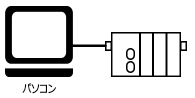
Select the driver for access station 1.

If you want to communicate with the unit one-to-one, select access station 1. If you do not want to use an indirect connection, select access station 1.
Access station 2: When you want to communicate with a PLC connected via a network from access station 1
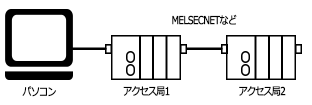
Select the driver for access station 2.

Add the driver for access station 2 and set the unit's communication settings to connect to access station 1.
Add another folder and set the connection parameters to access station 2 in the folder's communication settings.
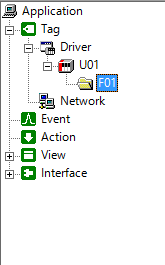

Access station 3: When you want to communicate with a PLC connected via a network from access station 2
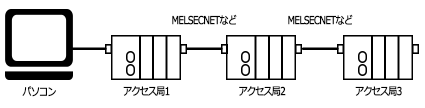

Add the driver for access station 2 and set the unit's communication settings to connect to access station 1.
Add another folder and set the connection parameters to access station 2 in the folder's communication settings.
