How to read the manual
This chapter is for reference information only.
For construction procedures, please refer to "Alarm" in the Surveillance System Construction Guide.
overview
The alarm function of FA-Panel is built by combining Panel Server's Alarm server actions and Panel Browser's alarm controls (Remote alarm grid client control/Remote alarm client control).
This section explains the settings for the Alarm server actions built on the server side.
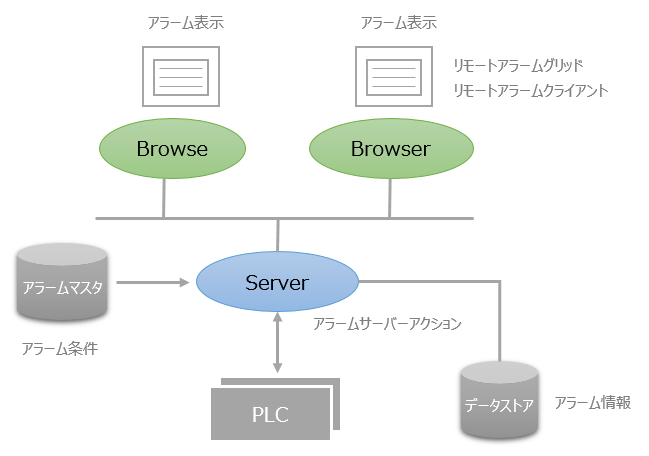
Alarm server actions monitor tag values in real time. Alarm server actions monitor the status of alarms, such as occurrence/recovery, according to the alarm conditions (alarm occurrence conditions for tag values) previously set in the alarm master, and the detected alarm information is recorded as history information on the Panel Server side. It is also possible to notify the connected Panel Browser of the alarm status or automatically send an email when an alarm is detected.
|
The screen libraries "Alarm Summary", "Alarm History", "Event History", and "Event Real Time" operate by connecting to the Alarm server action. These screen libraries are built using the Alarm Control (Remote Alarm Grid/Remote Alarm Client). |

Types of Alarm server
There are two types of Alarm server:
kinds |
Commentary |
Alarm server |
The alarm history is saved to a text file (CSV format).
|
Alarm server (ODBC) |
Alarm history is stored in a database (ODBC) (see here for supported databases).
|
If you want to save alarm information to a database, you can use the Alarm server (ODBC) action. If you are not using a database, use Alarm server using a CSV file.
About Alarm Master
The conditions for an alarm to occur are registered in a file called the "alarm master."
An alarm master is a text file (CSV) that describes alarm conditions, etc., and must be created manually using a text editor, Excel, etc. Alarm masters must be registered in advance before starting operation of the system.
For details about alarm masters, see "Alarm master format".
(Reference: Alarm master example)
Alarm ID, Occurrence recovery, Confirmation, Occurrence condition, Comment 0, Comment 1, Comment 2
[ALARMID],[RECOVER],[ACK],[ONCONDITION],[CM0],[CM1],[CM2]
0,y,y,U01.F01.M0000,M0 alarm. ,Equipment 1,1
1,y,y,U01.F01.M0001,M1 alarm. ,Equipment 1,1
2,y,y,U01.F01.M0002,M2 alarm. ,Equipment 2,2
: : :
Alarm Type
Alarms are classified into the following four types based on the combination of "occurrence/recovery" and "acknowledgement".
Alarm Type |
Occurrence and recovery |
confirmation |
remarks |
Occurrence and recovery/Confirmation |
○ |
○ |
An alarm that requires acknowledgment. |
Occurs and returns/No confirmation |
○ |
× |
An alarm that does not require acknowledgement. |
Occurrence and no recovery / Confirmation |
× |
○ |
This is a confirmed event (generated only when it occurs). |
No occurrence or recovery/No confirmation |
× |
× |
Generally referred to as an event (only generates occurrences). |
An alarm with "occurrence/recovery" is used when you want to know the occurrence and recovery of an alarm separately. For example, if the condition for an alarm is M0, an alarm is generated to notify you of an occurrence when M0 changes from OFF to ON. An alarm is generated to notify you of recovery when it changes from ON to OFF.
An alarm without "occurrence/recovery" is generally called an event, and is used when it is not necessary to know when it is recovered. In this case, an alarm is generated to notify of an occurrence only when it changes from OFF to ON, and nothing occurs when it changes from ON to OFF. It is used when there is no need to monitor recovery, and only when it is generated.
For alarms that require "acknowledgement," information can be added about whether an operator acknowledged the alarm that occurred.
|
When using event-type alarms ("Occurrence without recovery" and "No acknowledgement"), please note the following: For event type alarms, if the Panel Server goes from offline to online and the device alarm condition is already ON, an alarm will be generated immediately after going online. Similarly, if the Panel Server goes online, offline, and then online again while the device alarm condition is still ON, an alarm will be generated again. This behavior is normal, as event type alarms do not have recovery information. If you want to prevent an alarm from being generated every time Panel Server goes online, define the alarm with recovery from occurrence. In this case, you can create a screen equivalent to the event display by setting the Panel Server side as an alarm with recovery from occurrence and hiding the alarm information that notifies of recovery on the Panel Browser side alarm screen. If you are unsure which type to choose, we recommend using an alarm with recovery from occurrence. |
