Relationship between locale and date/time format
By specifying the date and time format, it is possible to display the date and time in a format that corresponds to the locale.
The date and time format is a format specification for specifying the format related to date and time. Examples of situations where you might specify a date and time format include specifying the format of the "clock part" in the parts library, setting the format of the date and time display specified in the screen library (for example, the date and time notation of a trend graph), or the date and time format passed to methods for date and time processing such as the CTimeToLocale (TL) method.
FA-Panel allows you to flexibly set the date and time format. In addition to displaying the date and time in formats from around the world, you can also set your own format.
The date and time format refers to the specified locale to obtain the date representation format.
For example, if you specify the system's pre-prepared date and time formats "@DATETIME" or "@LOCALE", the date and time will be displayed according to the locale settings set in the root Locale property (or the root LocaleDateTime property). Also, if you specify a locale ID (@+locale ID) such as "@ja" or "@de" in the date and time format, the display will follow the specifications of the specified locale.
For detailed specifications on date and time formats, see "Date and Time Formats" in Appendix.
|
The date and time format has various options and properties, and can be flexibly customized. For details on how to customize the date and time format, see "Date and Time Formats" in Appendix. |

Functions that support date and time format (excerpt)
Below are some of the features that support date and time formats (locale).
■ Date and time related methods
The following methods support date and time formatting:
These methods allow you to pass a date and time format to the parameter. For example, you can specify a format such as "@DATETIME", and they will return a date and time format according to the definition of the locale set on the date and time format side.
|
Of the date and time related methods, CTimeStr (TS) is a method used in older versions. It still works for upward compatibility, but does not support locales. We recommend using CTimeToLocale/CLocaleToTime for date and time related methods. |
■ Library parts
For the clock part in the parts library, specify the date and time format in the display format property.
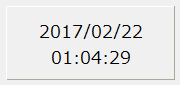
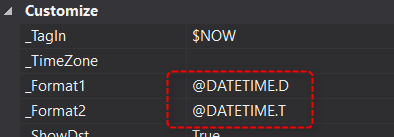
For example, you can specify formats such as "@DATETIME" or "@DATETIME.D", and the clock will be displayed in the date and time format defined by the locale.
For other screen library parts such as trend graphs, the date and time display settings are specified in the date and time format.