About the guide
Panel Editor has a guide function.
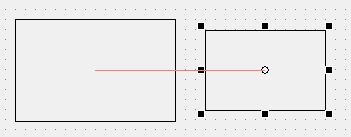
Enabling the guide function makes it easier to align objects already placed on a form. When using the guide function, guide lines are displayed when the coordinate position of an object being moved by dragging the mouse coincides with the top, bottom, center, left, or right position of another object, allowing you to place the object as if it were attached to the guide.
(Guide lines are displayed)
You can show or hide the guide using the following icon at the top of Panel Editor.

Alternatively, you can switch to the same mode by selecting "Edit" and "Show Guides" from the menu.
