Remove a file from a project
You can delete the information of each configuration file registered in a project by right-clicking on it in the workspace and selecting "Delete" from the menu that appears.
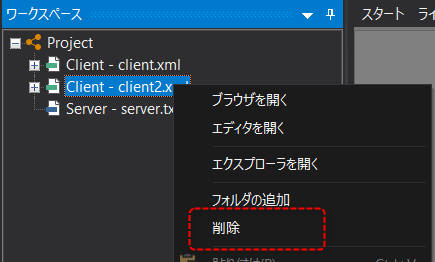
Please note that this operation only removes (deletes) the file from the project registration information; the actual file is not deleted.
If you want to delete the actual files, please delete them manually using Explorer etc.
|
Even if you delete a file from a project, the actual file will remain until you delete it from Explorer, etc. Therefore, if you accidentally delete a file from a project, you can restore it to its original state by adding the file again.
|
