Editing a project
FA-Panel allows you to manage configuration files collectively in units called "projects."
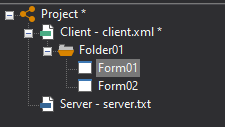
In addition to client configuration files, a project can also contain server configuration files. By including and managing server configuration files in a project, you can quickly call and open Panel Server from the server execution icon in Panel Editor. You can also register multiple client configuration files in a single project. This allows you to efficiently edit large-scale projects that consist of multiple client configuration files.
Furthermore, a project can also contain other projects. For example, in the case of a large-scale system configuration, where the monitoring system is divided into multiple projects, you can create a project to oversee the individual projects, and then register each project in that project. By doing so, you can edit all projects in the same editor just by opening the overseeing project from Panel Editor.
This page explains how to work with projects in Panel Editor.
•Add new client configuration file
•Select and add the client configuration file
•Add new server configuration file
•Select and add the server configuration file
•Add another project to a project
•Divide the client configuration file into multiple files