Hello world
This article explains how to write a script that displays the message "Hello world" using a message box.
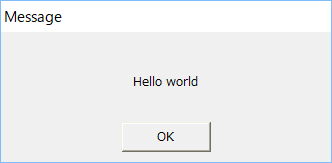
Specifically, write the following script in the Button control event pasted into the form.
event OnMouseUp(button)
{
	::OpenMsg("Hello world");
}
The event used here is "OnMouseUp". This event is called when the mouse button is released after being pressed once. This event is used frequently when you want to perform some processing when the mouse is clicked.
The specific method for writing this script is explained below.
How to write a script
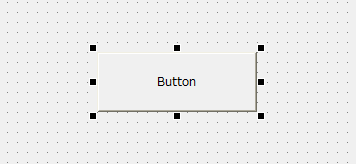
1.Launch Panel Editor and paste Button control into the form.
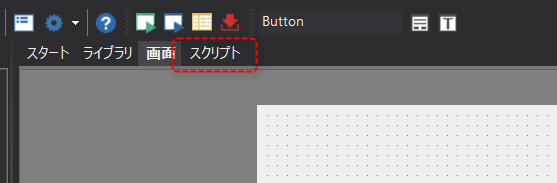
2.With the button selected, if you select the "Script" tab at the top of Panel Editor, the area displaying the form will switch to the script editor.
3.The script editor is now displayed. Open the event selection combo box in the top left.
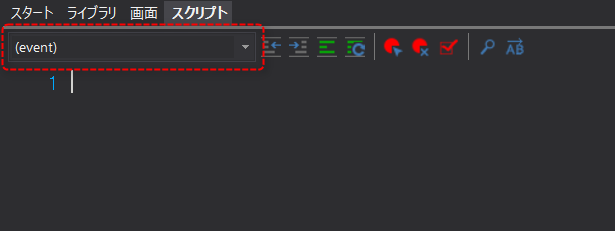
4.Select "OnMouseUp" from the list that appears.
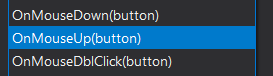
This will generate an OnMouseUp event like this:
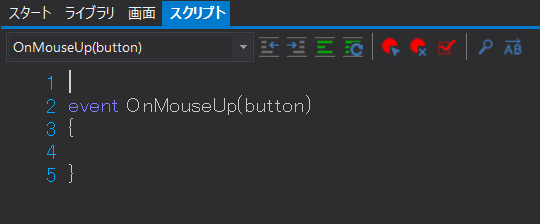
5.There is no processing written in the event yet. So, in the following part of the OnMouseUp event (the part surrounded by "{" and "}"),
::OpenMsg("Hello world");
It is written as follows.
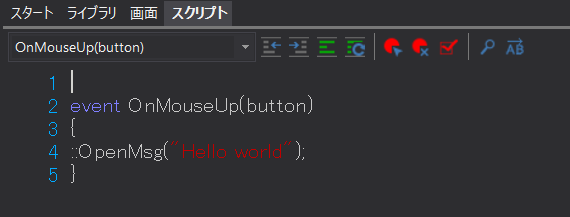
*Please enter all characters in half-width. Please be especially careful not to make any mistakes with "(" and ")".
* The string to be displayed is enclosed in double quotation marks (").
*Please be careful not to forget the "::" (two colons) at the beginning and the ";" (semicolon) at the end of the line.
*When writing with paragraphs (so-called "indentation"), half-width spaces or tabs can be used. Full-width spaces cannot be used.
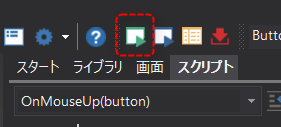
6.Click the icon below (the Run icon) at the top of Panel Editor to run Panel Browser.
7.The form is now displayed. Please click the button in the center.
A dialog popped up saying "Hello world".
The "OpenMsg" used this time is one of the so-called "common methods" and can be called and used in the same way from all objects.
In addition, the "::" (two colons) at the beginning of "OpenMsg" is a keyword that represents the root, and is the same as "root.". In other words, putting "::" at the beginning means that the root method will be used.
event OnMouseUp(button)
{
	::OpenMsg("Hello world");
}
|
There are many convenient methods available for routes. For details on route methods, please refer to the description of "Route Methods" in the Control Reference. |

|
When you copy an object with a script written in it, the script written in the original object is copied to the duplicated object as is. For example, if you duplicate the button object created in the above example by copying and pasting, the same message will be displayed when you click either button. |