|
Set data in the cell.
syntax
SetData(
col,
row,
data
)
Parameters
col
|
|
Type:
|
Number
|
|
Index of the column starting from 0. If you want to specify the header section, specify the index in the negative direction starting from -1.
|
row
|
|
Type:
|
Number
|
|
Index of the line starting from 0. If you want to specify the header section, specify the index in the negative direction starting from -1.
|
data
|
|
Type:
|
General purpose
|
|
data.
|
Return Value
|
|
Type:
|
Boolean
|
|
FALSE - Failure. TRUE - Success.
|
 Explanation
Set data in the cells.
SetData sets the text to be displayed in the cell. SetData sets the text to be displayed in the grid as shown in the table below.
|
|
|
|
Label Type
|
label
|
The text is displayed as is.
|
Edit box type
|
edit
|
The text is displayed as is and can be edited by the user.
|
Combo Box Type
|
combo
|
The text is displayed as is and can be edited by the user.
|
Meter Type
|
meter
|
It is converted to a numerical value and displayed as a meter from the maximum value (Max) to the minimum value (Min). When the ShowText property is TRUE, the text is displayed as is.
|
Lamp type
|
lamp
|
Converted to a Boolean and displayed as a ramp. Any number other than T, TRUE, and 0 is converted to TRUE (ON). F, FALSE, and 0 are converted to FALSE (OFF).
|
Switch Type
|
switch
|
Converted to a Boolean and displayed as a switch, allowing the user to toggle On/Off. All numbers other than T, TRUE and 0 are converted to TRUE (ON). F, FALSE and 0 are converted to FALSE (OFF).
|
Button type
|
button
|
The text is displayed as is.
|
Image type
|
image
|
Nothing is displayed.
|
Unspecified
|
|
The text is displayed as is.
|

|
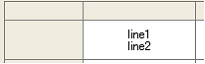
Label/button/meter type text supports multiple lines. To start a new line, enter the newline character as follows:
this.SetData(0, 0, "line1" + ::RET() + "line2");
|
|
reference
AddRow
AddCol
InsertRow
InsertCol
DelRow
DelCol
SetData
GetData
SetColData
SetRowData
SetTableData
GetTableData
FindRowData
FindColData
ClearData
Clear
|