Registering screen libraries as separate menu items
Screens in a screen library can be registered as multiple menu items separately at the same time, or displayed in a split screen. Some screen libraries allow you to manage the settings of each registered screen library separately. For example, if a trend graph is already registered in a menu, you can add a new "trend graph 2" to the menu and set each pen registration separately.
■ Example of calling from the standard framework menu
The following explains a setting example using a trend graph.
|
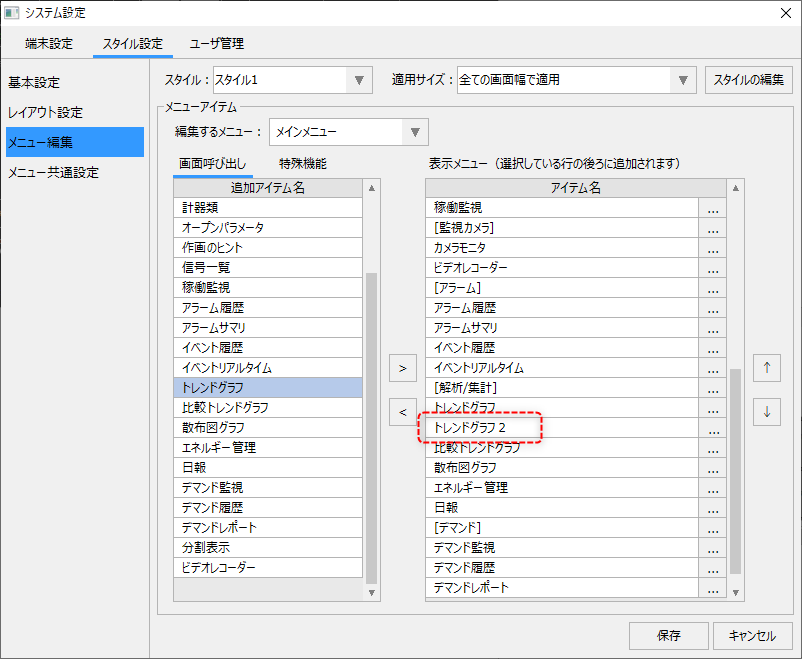
Display the menu editor from the standard framework settings screen.
In the example on the left, the Trend Graph Library is selected and the display string in the Advanced menu settings is set to "Trend Graph 2."
|
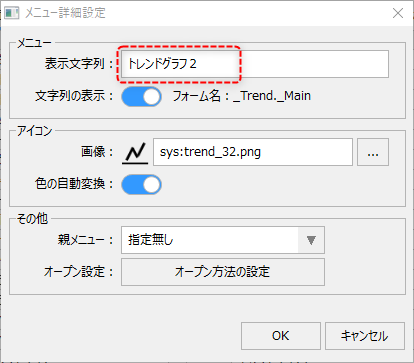
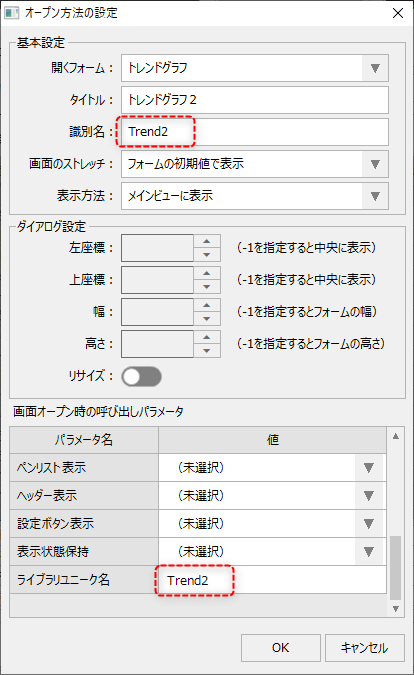
When you click the "Open method settings" button from the Advanced Settings menu, the following dialog box will appear.
|
Specify any name that is unique across the entire system for the "identification name" on the left, and specify a unique name for the "library unique name" in the calling parameter. Note that you can specify the same name for the identification name and library unique name. In the example on the left, both are "Trend2".
By setting it up in this way, you can make "Trend Graph 2" operate with independent pen settings, separate from the "Trend Graph" originally added to the main menu.
|