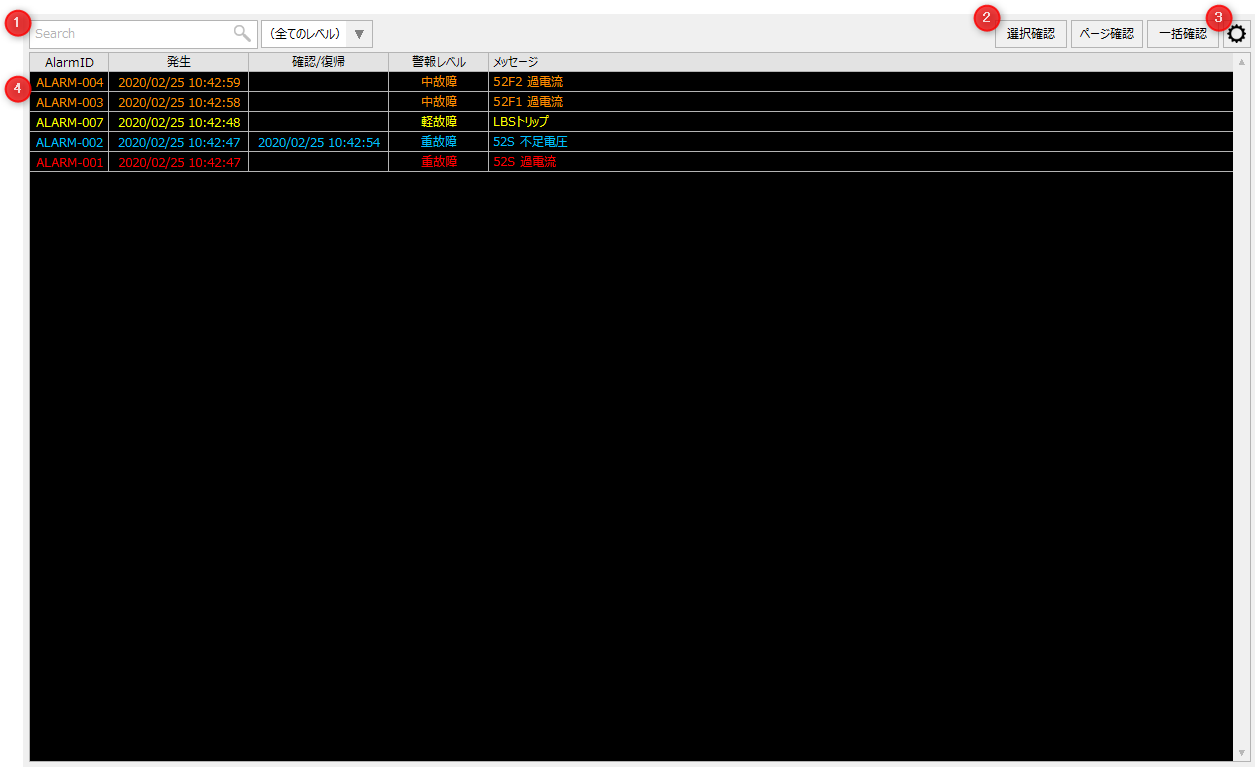
Alarm summary screen explanation
#
|
name
|
explanation
|
1
|
Refine search
|
Narrow down currently occurring alarms for each condition.
filter
|
This performs a fuzzy search for a message string. Messages that contain the entered filter string will be displayed.
|
Warning Level
|
The display will be of the same level as the alarm level.
|
Clear button
|
Clears the condition. You can show or hide the button with the "_ClearButton" custom property. The default is hidden.
|
Search button
|
Searches based on conditions. You can show or hide the button with the "_SearchButton" custom property. The default is hidden.
|
|
2
|
Confirm button
|
Check for open alarms.
Confirm selection button
|
Check the alarms selected in the list.
|
Page confirmation button
|
Check the unacknowledged alarms on the page that are displayed in a list.
|
Bulk confirmation button
|
Acknowledge all unacknowledged alarms.
|
|
3
|
Settings Menu
|
Opens the settings menu. Each time you click the icon, the settings menu will be displayed/hidden.
For information on the settings menu, please refer to "Settings Menu".
|
4
|
Alarm List
|
Displays a list of alarms.
|