Demand report screen explanation
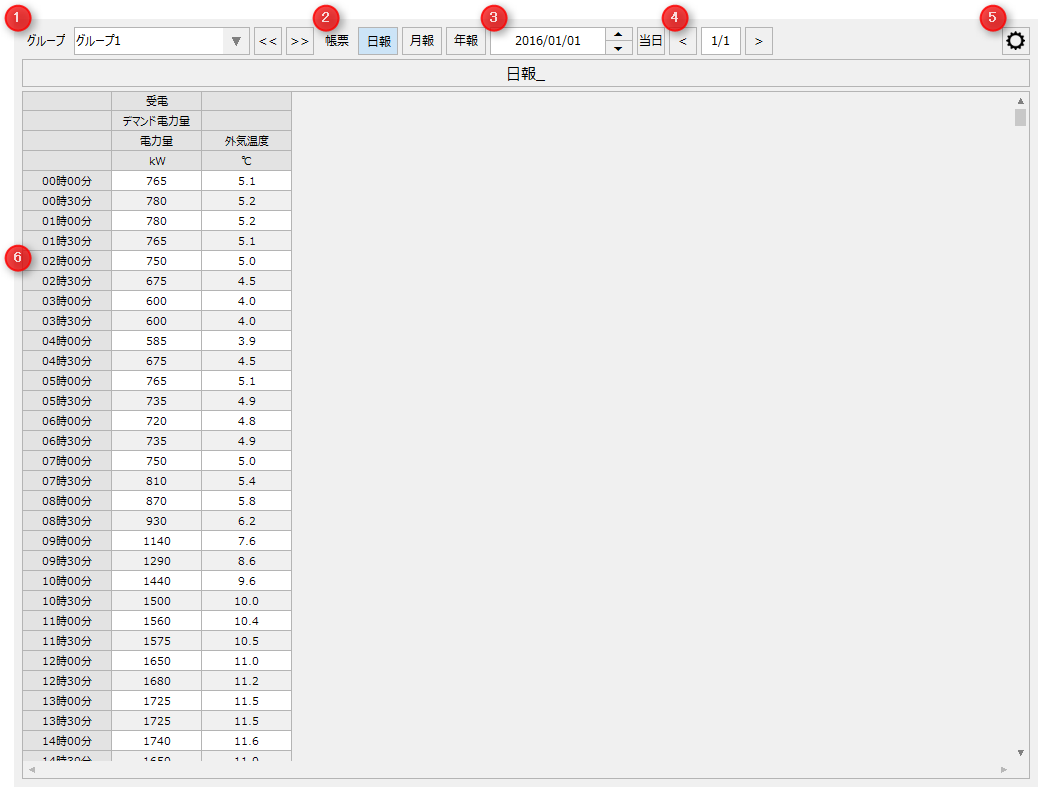
# |
name |
explanation |
||||||
|---|---|---|---|---|---|---|---|---|
1 |
Report Group Name |
Select the report group to display in the report data list.
|
||||||
2 |
Report Type |
Select the report aggregation unit. "Daily report" displays aggregated data managed on a daily basis. "Monthly report" displays aggregated data managed on a monthly basis, and "Annual report" displays aggregated data managed on a yearly basis.
|
||||||
3 |
Target date |
Select the target date to be displayed in the report data list.
|
||||||
4 |
Page Specifications |
If the report group has multiple pages of data sources registered, this will switch pages.
|
||||||
5 |
Settings Menu |
Opens the settings menu. Each time you click the icon, the settings menu will be displayed/hidden. For information on the settings menu, please refer to "Settings Menu".
|
||||||
6 |
Report data list |
Displays a list of report data according to the report type.
The displayed content changes depending on the document type.
In addition, the following information is displayed in the list for each report type. •Header 1-4 •Total: Display the total value for each row •Average: Display the average value for each row •Maximum: Display the maximum value for each row •Min: Display the minimum value for each row
|