Character display 1
|
Character Display 1 is a component for displaying the character string received from the tag. |
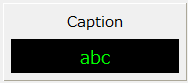
Specify the tag to be displayed as the input tag (_TagIn).
In addition to the input tag, by specifying a tag for fault identification in the fault identification tag (_TagFault), it is also possible to display a fault based on signals such as equipment abnormalities received from downstream.
Custom Properties
Tag configuration |
Input Tags |
_TagIn |
Specify the tag path of the input tag. |
Fault Identification Tag |
_TagFault |
Specifies the tag path of the fault identification tag. |
|
Display settings |
caption |
_Caption |
Specify a caption. |
Value Text Color |
_StatusTextColor |
Specifies the display color of the string. |
|
Value Background Color |
_StatusFillColor |
Specifies the background color of the string. |
|
Caption Color |
_CaptionColor |
Specifies the color of the caption. |
|
Background Panel |
_BackPanelColor |
Specifies the color of the background panel. |
|
others |
Display value |
_Value |
You can directly assign a display value to this property from a script. |
Usage Example
1) Input tag specified/No fault identification tag
The value of the tag specified in the input tag will be displayed as a string.
|
It displays the raw value received from the tag. |
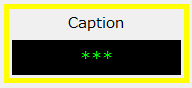
If the quality flag of the input tag is BAD, a fault is displayed.
|
The part will be framed in yellow and will flash. |
2) Input tag specified/Fault identification tag
If you specify a fault identification tag, you can receive the fault status of the device via the tag. For example, if you can receive a fault status (such as a sensor abnormality) from the downstream side as a signal separate from the device's measurement value, you can specify the tag path of that signal as the fault identification tag to display the fault along with the state of the quality flag of the input tag.
|
When the fault identification tag is False, the value received in the input tag is displayed normally.
|
|
A fault is displayed when the fault identification tag is true or when the quality flag of the input tag is bad.
|
3) Assigning values via script
You can display any string by assigning it from the script without specifying an input tag.
If you want to assign a value directly from a script, do so to the "_Value" property.
|
If you assign a value directly from a script, you cannot use a fault identification tag. For more information about scripts, see "Scripts". |
