Setting safety measures for continuous operation
Panel Server has a mechanism to automatically restart an application or the OS if the application terminates abnormally.
This setting is done from the application settings of Panel Server.
1.Start Panel Server and right-click Application in the tree on the left to display its properties.
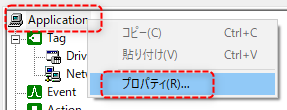
2.From the "Basic Settings" tab, check "Continuous Operation Safety Measures."
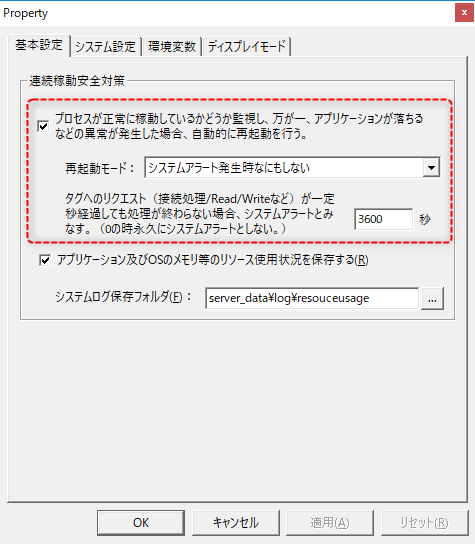
There are three restart modes to choose from:
•Do nothing when a system alert occurs
•Restart the application when a system alert occurs
•Restart the OS when a system alert occurs
You can also have the system alert Panel Server (or Windows itself) restarted if a request to a tag is not processed within a certain number of seconds. To enable this feature, set the above setting to a number of seconds other than 0.
Once you have completed the settings, click the OK button to save them.
|
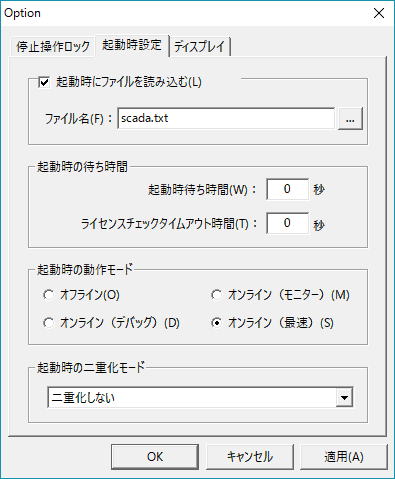
By configuring the continuous operation safety measures, Panel Server itself will be automatically restarted if Panel Server terminates abnormally, but do not forget to configure it so that it automatically loads the configuration file and runs online after startup. Specifically, in the Panel Server startup settings options, check "Load file at startup" to specify the server configuration file you want to load automatically, and set the operation mode at startup.
For details on setting up the automatic function of Panel Server, please refer to the description in "Automatic startup of Panel Server". |