About encrypting client configuration files
The client configuration file is saved as an xml format text file. If you do not want to disclose the contents during release, you can encrypt the client configuration file.
Encrypted configuration files (with the extension "brw") can be loaded and executed from Panel Browser, or loaded and executed from other configuration files using the AddResourceFile method.
There are two ways to encrypt the client configuration file:
Setup feature for encryption on output
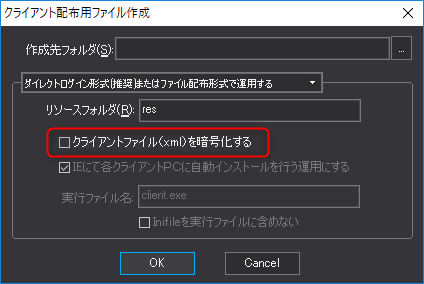
When outputting a set of client configuration files using the setup function of
Panel Editor, you can create an encrypted file (xxx.brw) by checking the box for "Encrypt client file (xml)".
Encrypt XML files individually
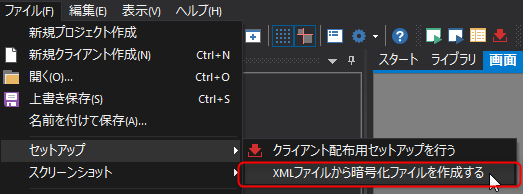
Select "File - Setup Create encrypted file from -XML file" from the
Panel Editor menu and select the target XML file from the screen that appears, and the encrypted file (xxx.brw) will be output in the same folder as the client configuration file. This method can be used, for example, when you want to encrypt individually the configuration files that were created in multiple XML files during development.
|
Encrypted brw files cannot be decrypted back to the original xml file. Always keep the original xml file for development purposes. |
