Monitor demand alerts with Alarm server
If you want to monitor the occurrence of demand alarms using the Alarm server action of Panel Server, you can do so by setting it up as follows.
1.Prepare a tag to output a demand alarm.
Although a PLC device tag can be specified as the tag for alarm output, it is recommended to use a "memory device" especially if there is no need to pass the demand alarm status as a signal to the downstream side.
In the standard project, the memory device unit "DEMAND" is already registered, and the following three tags are registered under the "F01" folder.
•DEMAND.F01.ALARM1 ・・・First warning (light warning)
•DEMAND.F01.ALARM2 ...Second alarm (medium alarm)
•DEMAND.F01.ALARM3 ...Third alarm (serious alarm)
2.In the demand alarm settings on the demand monitoring settings screen, define the tag path to transfer the demand alarm status to the alarm output tag.
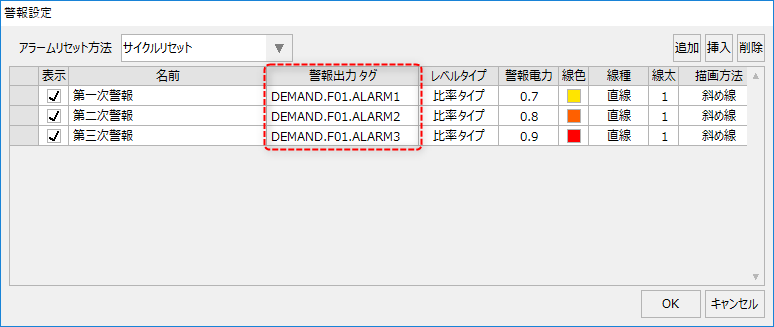
With this setting, when the demand action detects an alarm level, the detection status will be output to the specified tag.
3.In the "Alarm Master" of Alarm server, register the alarm output tag of the demand set above as an alarm occurrence condition.
|
For information on how to set up the alarm function, see "Alarm" in the Surveillance System Setup Guide. |
