Relationship between demand monitoring and actions
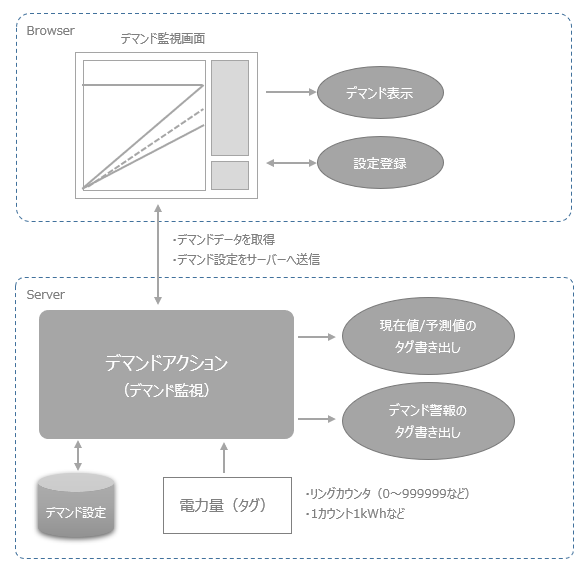
The demand monitoring function of FA-Panel performs demand monitoring using demand actions on the Panel Server side and a demand monitoring screen library on the client side.
The demand monitoring screen works by connecting to a demand action. The demand monitoring screen is displayed from the Panel Browser when the Panel Server is running online.
Various settings for demand actions are made on the setting screen of the demand monitoring screen. On the setting screen, you need to set various parameters such as the tag path of the demand tag to be monitored, the contract power, and the target power.
Relationship between demand history/demand report and action
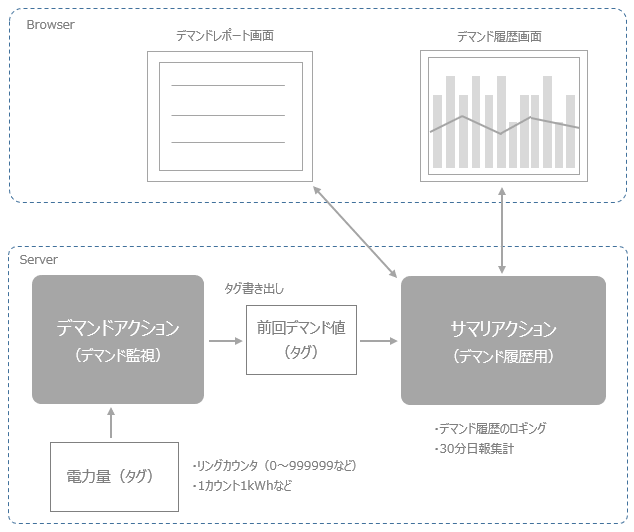
The demand history screen and demand report screen are provided as auxiliary functions for FA-Panel demand monitoring.
These screens work by connecting to a summary action. Demand actions have a function to output demand monitoring information to tags, and the "previous demand value" tag included in this information is logged and aggregated by summary actions and displayed on each screen. Therefore, it is assumed that the demand history and demand report will be used in combination with demand monitoring.
|
Summary actions can register multiple actions and run them simultaneously. Summary actions for demand history and demand reports should be prepared as separate actions dedicated to demand function aggregation, separate from summary actions for normal daily report aggregation. In the standard project, a summary action called "DemandSummary" is registered and is set to log and aggregate demand power in 30-minute intervals. |
