Demand monitoring information output tag
Information related to demand monitoring, such as the demand alarm detection status and previous demand value, can be output to tags.
The tags to which various information will be output can be specified from the demand monitoring settings screen.
In the sample standard project, the following tags are already registered. These tags can be used for logging and aggregation of demand history (summary action "DemandSummary"), or for monitoring alarms in conjunction with Alarm server.
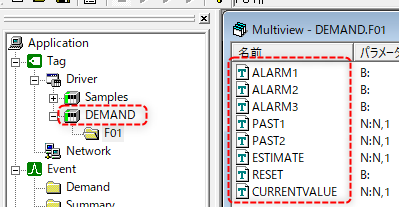
Registered unit: DEMAND
Type: Memory device
The following tags are registered under the F01 folder.
Name (tag name) |
device |
Intended Use |
||
ALARM1
|
Bit Tag |
When the demand forecast value exceeds the primary alarm setting threshold, this tag turns ON. This tag is specified as the alarm output tag on the demand alarm setting screen.
If you want to monitor alarms, register this tag in the alarm master.
|
||
ALARM2
|
Bit Tag |
Ditto. Secondary warning above.
|
||
ALARM3
|
Bit Tag |
Ditto. Tertiary alarm as above. |
||
PAST1
|
Numeric Tags |
Past demand values (previous demand) are stored. This tag is specified as the value storage tag on the Past Demand Display Settings screen.
|
||
PAST2
|
Numeric Tags |
Same as above. The demand value from two times before last is stored. |
||
ESTIMATE
|
Numeric Tags |
The forecast value for the current demand cycle is stored. This tag is specified as the forecast value output tag on the demand detailed setting screen.
|
||
RESET
|
Bit Tag |
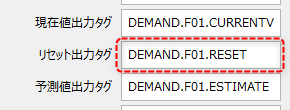
This tag turns ON when the demand cycle is reset. This tag is specified as the reset output tag on the demand detailed settings screen.
|
||
CURRENTVALUE
|
Numeric Tags |
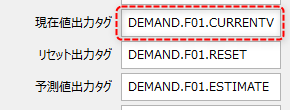
The current value of the current demand cycle is stored. This tag is specified as the current value output tag on the demand detailed setting screen.
|
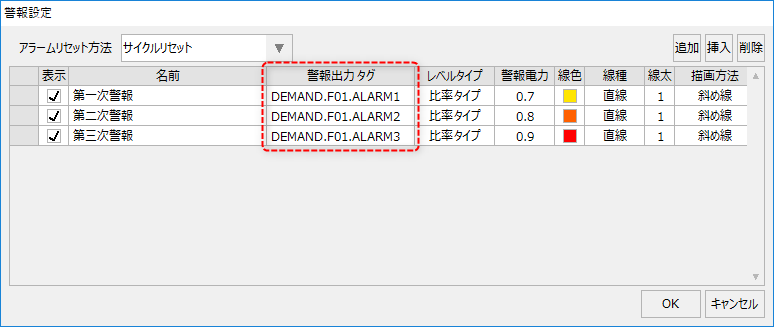
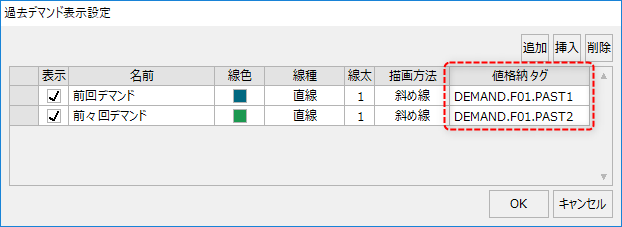

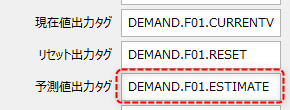
|
When you add configuration items to your demand monitoring settings, please also add the above tag registrations.
Example: If you set four alarms on the alarm setting screen, register ALARM1 to ALARM4.
|
|
If the number of metering points to be monitored for demand increases, you will need to register multiple demand actions. In that case, copy and use the above folder "F01". For example, if you need a second demand monitor, add a "DEMAND.F02" folder and copy the tags in the F01 folder as is, and set them as output tags from the settings screen of the added demand action. |